A common production complaint sounds like this:
“The system is slow when users post documents.”
Sometimes that is true. But very often, the real issue is not slowness. It is waiting.
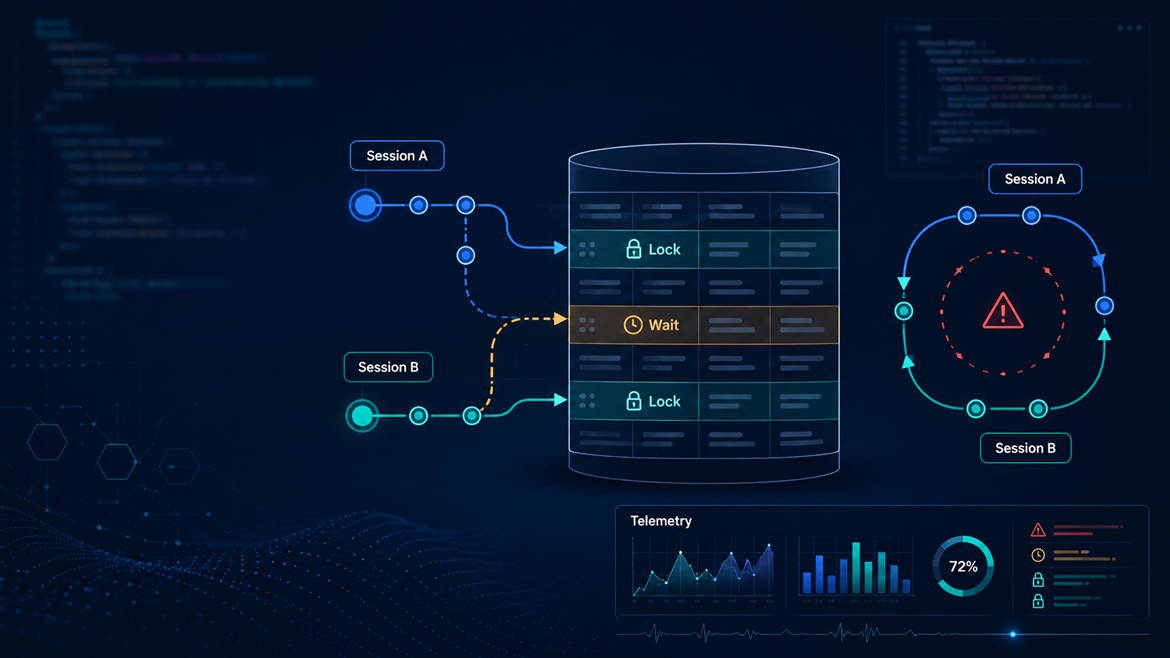
One session holds a lock. Another waits for it. A third enters the same flow and waits too. Then someone retries from the client, a Job Queue entry overlaps, or an integration fires parallel requests against the same document. Suddenly, the problem looks like random production instability, and the extension being blamed may only be the victim.
This article explains how to reason about locking in Business Central from an AL architecture perspective: when locks are necessary, when they are self-inflicted, and how to troubleshoot production issues without guessing.
The Real Problem: Concurrency, Not Just Performance
A slow query consumes time. A lock wait consumes someone else’s time.
That distinction matters. If a report runs slowly but does not block operational users, the impact may be acceptable. If a small customization holds a lock during posting, it can stop everyone else from completing normal work.
Locking problems usually surface around shared business objects: sales and purchase documents, item and G/L entry flows, setup tables, number assignment, posting routines, Job Queue entries, and API imports. The AL code causing the problem often looks harmless in isolation. A FindSet, a Modify, a setup read, these are fine with one user. Under concurrency, the same logic can become a recurring bottleneck.
How LockTable Actually Works
The official syntax is:
Record.LockTable([Wait: Boolean] [, VersionCheck: Boolean])
When the session does not use read scale-out, LockTable:
- Starts a transaction.
- Makes subsequent read statements against that table apply
UPDLOCKuntil the transaction is committed.
When the session uses read scale-out, subsequent reads use REPEATABLEREAD instead.
The lock is released when the transaction commits.
The critical implication: LockTable affects the entire transaction from that point forward, not just the next line. It is not a local, narrow guarantee.
The Classic Anti-Pattern
local procedure UpdateCustomerCreditData(CustomerNo: Code[20])
var
    Customer: Record Customer;
    Currency: Record Currency;
begin
    Customer.LockTable(); // ← Lock acquired immediately

    Currency.FindSet();   // ← Unrelated work while lock is held

    Customer.Get(CustomerNo);
    Customer.Validate("Credit Limit (LCY)", Customer."Credit Limit (LCY)" + 1000);
    Customer.Modify(true);
end;
The problem is not that LockTable exists; it may be needed. The problem is that it is called before unrelated work, maximizing the time the lock is held.
The Safer Pattern
local procedure UpdateCustomerCreditData(CustomerNo: Code[20])
var
    Customer: Record Customer;
    Currency: Record Currency;
begin
    Currency.FindSet(); // ← Read unrelated data first

    Customer.LockTable(); // ← Lock acquired as late as possible
    Customer.Get(CustomerNo);
    Customer.Validate("Credit Limit (LCY)", Customer."Credit Limit (LCY)" + 1000);
    Customer.Modify(true);
end;
This does not eliminate contention. It reduces lock duration, and that is often the difference between acceptable production behavior and recurring timeouts.
ReadIsolation: A More Precise Tool
For a long time, LockTable was the only explicit isolation control in AL. Modern AL provides ReadIsolation, which is localized to a specific record instance rather than affecting all subsequent reads against a table.
local procedure GetNextEntryNo(): Integer
var
    GLEntry: Record "G/L Entry";
begin
    GLEntry.ReadIsolation := IsolationLevel::UpdLock;
    GLEntry.FindLast();
    exit(GLEntry."Entry No." + 1)
end;
Because ReadIsolation is set on GLEntry only, other record variables in the same transaction are unaffected. LockTable would have promoted all subsequent reads against the G/L Entry table to UPDLOCK for the rest of the transaction; ReadIsolation does not.
ReadIsolation is available from runtime version 11.0, so validate the target runtime if you support older Business Central versions.
Available Isolation Levels
| Level | Behavior |
|---|---|
Default | Follows the transaction/table isolation state, equivalent to not explicitly choosing an isolation level. |
ReadUncommitted | Dirty reads allowed. No locks taken, no locks respected. |
ReadCommitted | Only reads committed data. No guarantee rows stay stable through the transaction. |
RepeatableRead | Reads are stable; shared locks held for the transaction lifetime. |
UpdLock | Reads for update; disallows concurrent readers with the same intent. |
ReadIsolation can also lower isolation. A common use case is getting an estimated record count without blocking others:
local procedure GetEstimatedCount(TableNo: Integer): Integer
var
    RRef: RecordRef;
begin
    RRef.Open(TableNo);
    RRef.ReadIsolation := IsolationLevel::ReadUncommitted;
    exit(RRef.Count);
end;
This matters inside event subscribers: if earlier code raised the transaction’s isolation level, a ReadUncommitted instance lets you read without locking everyone out.
LockTable vs ReadIsolation: When to Use Which
| Situation | Prefer |
|---|---|
| Protect a read-before-write sequence on a whole table | LockTable, acquired late |
| Stronger isolation for one specific record variable | ReadIsolation |
| Inside an event subscriber (you don’t own the transaction) | ReadIsolation, or redesign |
| Reading setup or reference data | Neither — read before any locks |
| Trying to “fix” a deadlock without diagnosis | Neither — diagnose first |
A Note on FlowFields
ReadIsolation also changes how FlowFields are calculated. Normally, FlowField calculation uses the isolation level of the target table in the formula. When ReadIsolation is set on the source record, that level is used instead. This matters when FlowFields are calculated inside a transaction that has already been promoted to a higher isolation level.
Tri-State Locking (Version 23 and Later)
In Business Central 2023 release wave 2 (version 23) and later, tri-state locking changes what happens after a session writes data.
Under legacy behavior (version 22 and earlier), a write caused all subsequent reads against that table to use UPDLOCK. Under tri-state locking, those subsequent reads use ReadCommitted instead of UpdLock. This reduces unnecessary blocking in read-after-write flows, especially when the session does not actually need update intent for the later read.
Important caveat: explicitly calling LockTable disables this optimistic behavior and reverts to the legacy locking pattern. So tri-state locking helps you by default, but it is still possible to opt back into aggressive locking by calling LockTable unnecessarily.
For on-premises versions 23–25, tri-state locking requires EnableTriStateLocking = true in the server configuration. Later versions always use it.
If you support both older and newer environments, do not assume identical locking behavior. Test under the actual target runtime.
Lock Timeout vs Deadlock
These are related but different problems.
A lock timeout means one session waited too long for another to release a resource. The failing user is usually the victim, not the cause. The blocking session is often a different user, a background process, or an integration call.
A deadlock means two or more sessions each hold a resource the other needs, and neither can proceed. SQL Server resolves this by terminating one transaction (the “victim”). The symptom looks random because it depends on timing. Retrying gets the user through, but the underlying design issue remains.
The most common causes of deadlocks in BC custom code:
- Inconsistent lock ordering across two code paths touching the same tables in different sequences.
- Long transactions that accumulate locks across many tables.
- Event subscribers that add unpredictable lock acquisition inside an existing posting flow.
- Parallel integration calls competing for the same parent document.
Production Scenarios
API Calls Updating the Same Parent Record
Microsoft explicitly documents this: inserting child records under the same parent in parallel causes locks on both the parent table and the integration record table. The recommendation is to wait for the first call to finish, or use OData $batch to serialize them.
From the external system’s perspective, parallelism looks like a performance gain. From Business Central’s perspective, those parallel calls are competing for the same business document. The solution is often not “increase throughput”, it is “serialize operations on the same entity.”
Event Subscribers in Posting
When a subscriber runs during posting, it participates in a transaction it does not own. If it performs broad reads, calls LockTable, or loops large datasets, it increases the lock duration of an already lock-sensitive process.
A production-safe subscriber should:
- Do the minimum required work.
- Read setup data before any lock-sensitive operations.
- Prefer
ReadIsolationoverLockTable. - Avoid expensive calculations or FlowField computation inside the transaction.
- Queue non-critical work for later processing when business consistency allows it.
In multi-extension projects, each subscriber may look harmless alone. Under load, the combined transaction can be significantly more expensive than any single extension review suggested.
Job Queue Contention
Background jobs compete with interactive users for the same records. Lock timeout telemetry includes clientType (such as Background or Web), which helps identify whether the blocking or victim workload is interactive or background.
Practical guidance:
- Prevent overlapping runs over the same records.
- Keep transaction size small.
- Avoid repeatedly locking setup or parent records inside loops.
- Make retries idempotent rather than aggressive.
Common Mistakes
Calling LockTable too early. The most common mistake. Developers call it at the top of a procedure, then do unrelated reads and calculations before the actual write. This maximizes lock duration. Read setup first. Calculate what you can. Acquire the lock as late as possible.
Using LockTable to fix a deadlock. Adding a lock earlier may eliminate one race condition and introduce a different blocking pattern. Before changing any locking code, answer: Who is the victim? Who holds the lock? Which tables are involved? In what order?
Reading setup after writes. If setup is read after a Modify or after LockTable, the transaction holds locks during work that could have happened earlier. In most cases, setup data does not need to be transactionally protected with the write.
Parallelizing the wrong integration operations. Parallelize across independent entities (different customers, different orders). Serialize operations that touch the same parent document. This is not always the highest theoretical throughput, it is often the highest sustainable production throughput.
Ignoring version-dependent behavior. Locking behavior in an older on-premises environment may differ significantly from a modern SaaS environment. Old advice, “always call LockTable before reading anything you might update”, should be revisited in version 23+ contexts.
Troubleshooting
Start With the Symptom, Not the Assumption
The user-facing error is the symptom. The blocking session may be a different user, a Job Queue entry, an integration call, or a report. Collect:
- Exact timestamp, company, user or integration identity.
- Action being performed, document or record involved.
- Whether a Job Queue entry was running.
- Whether integrations were active.
- Whether the issue started after a deployment.
Then move to telemetry.
Lock Timeout Telemetry (Application Insights)
Two events are emitted (available since version 16.0):
| Event | What it shows |
|---|---|
RT0012 – Database lock timed out | The victim session: AL object, extension, stack trace, clientType, sessionId, snapshotId |
RT0013 – Database lock snapshot | Lock state at timeout: sqlTableName, sqlLockRequestMode, sqlLockRequestStatus, sessions holding locks |
Important: the RT0012 event represents the victim, not the blocker. The RT0013 snapshot may have captured the holding session, but this is not guaranteed. Correlate events using snapshotId. The goal is to answer: who waited, who held the lock, and which table was involved?
Database Locks Page
Useful for a live snapshot when users are currently blocked. Not useful after the fact unless you also have telemetry.
Deadlock Monitoring
For on-premises deployments, Business Central Server can log deadlocks to the Windows Event Log, including AL object information and the SQL deadlock XML report. For SaaS, rely on Application Insights telemetry and the admin tools available for the environment; do not assume direct SQL Server or Event Viewer access.
Design Checklist
Before adding any explicit lock, answer these questions:
- What exact inconsistency am I preventing?
- Which records need protection, and are they properly filtered?
- Can I acquire the lock later?
- Can
ReadIsolationreplaceLockTablehere? - What code runs after the lock is acquired?
- Could this subscriber be running inside a transaction I don’t own?
- Have I tested with concurrent sessions?
- Have I checked telemetry from the actual production issue?
If you cannot answer these, the lock is premature.
When Not to Add More Locking
More locking is not always the answer. Do not reach for LockTable or stricter isolation when the real issue is:
- an integration sending parallel requests against the same parent document;
- a Job Queue process overlapping with itself;
- broad reads or FlowField calculations inside posting subscribers;
- missing filters or poor transaction batching;
- unclear telemetry where the blocking session has not yet been identified.
In these cases, adding more locks may suppress the symptom temporarily while making the transaction shape worse. Diagnose first. Lock only what the business process actually requires.
Conclusion
Locking in Business Central is not solved by memorizing LockTable.
It is solved by understanding transaction shape.
LockTable is a valid tool when you need to protect a read-before-write sequence, but it affects all subsequent reads against that table until the transaction commits. ReadIsolation is narrower and often more appropriate, especially inside event subscribers and shared flows. Tri-state locking reduces default post-write locking pressure in version 23+, but explicit LockTable calls still opt you back into aggressive behavior. And most deadlocks are not fixed by adding more locks, they are fixed by understanding lock ordering, reducing transaction scope, and serializing the right operations.
When the next customer says “Business Central is slow,” do not start with hardware or random retries.
Start with the transaction. Find the waiting session. Find the holding session. Then change the design with evidence.