- What Is Business Central 28?
- Business Central 28 Release Timeline
- Why Business Central 28 Matters
- AI and Copilot Features in Business Central 28
- Supply Chain and Inventory Improvements
- Financial Management Features
- Sustainability Features
- Shopify and E-commerce Enhancements
- Developer Features in Business Central 28
- Governance and Administration Enhancements
- Should You Start Testing Business Central 28 Now?
- Final Thoughts
- Official References
Microsoft is continuing to expand Dynamics 365 Business Central with stronger AI capabilities, better reporting, smoother operational workflows, and more modern developer tooling. With Business Central 28 (2026 Release Wave 1) now available in preview, partners, consultants, and developers already have enough official information to start evaluating what this release means in practice.
According to the official Microsoft Learn documentation, update 28.0 is currently available as a public preview for Business Central online sandbox environments, with more information for production and on-premises scenarios expected when the release reaches general availability in April 2026. You can review the official release page here: Update 28.0 public preview for Business Central 2026 release wave 1.
In this article, I’ll walk through the most important Business Central 28 features for both users and developers, and explain why this release is worth watching closely.
What Is Business Central 28?
Business Central 28 is the version number for Dynamics 365 Business Central 2026 Release Wave 1.
Microsoft’s official “What’s new and planned in Business Central” page lists version 28.0 (preview) as the current March 2026 preview update, confirming that it belongs to the upcoming major release cycle. Official source: What’s new and planned in Business Central.
At this stage, Microsoft clearly states that:
- the current documentation is prerelease
- the features are preview features
- the preview applies to online sandbox environments only
- more information will be added when version 28.0 becomes generally available
That is important because it means this blog post should be read as a validated preview overview, not as a final GA changelog.
Business Central 28 Release Timeline
The public preview for Business Central 28 runs in March 2026, ahead of expected general availability in early April 2026. Microsoft also notes that preview sandbox environments are automatically deleted 30 days after the preview becomes generally available.
If you want to validate the release yourself, Microsoft explains how to use preview environments in Business Central. That page confirms that preview environments are sandbox environments created on or updated to a preview version, and that they are specifically intended for reviewing new functionality, validating extensions, and testing updates before rollout.
This matters for partners and customers because it gives a safe way to evaluate new features without touching production.
Why Business Central 28 Matters
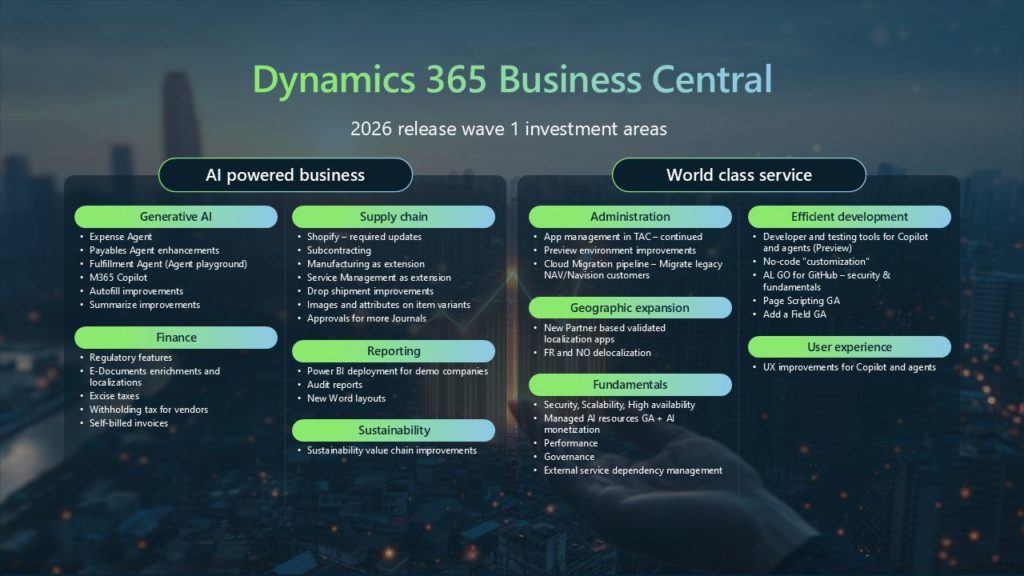
This release is interesting because it is not limited to one area. Microsoft is improving Business Central across several high-value domains:
- Copilot and AI agents
- supply chain and inventory workflows
- financial management
- Shopify and e-commerce integration
- reporting and analytics
- AL developer productivity
- governance and administration
That broad scope makes Business Central 28 relevant not only for developers, but also for finance teams, consultants, operations users, and solution architects.
AI and Copilot Features in Business Central 28
AI remains one of Microsoft’s biggest priorities in Business Central, and version 28 adds several new capabilities under Copilot and agents.
The official preview includes features such as:
- discovering emails that have been processed by Payables Agent
- getting item insights with advanced KPIs and summary
- managing tasks from agents in a dedicated task pane
- reviewing agent-generated content directly on pages
- stopping active tasks for a selected agent
- using AI resources for Copilot extensions
These additions show that Microsoft is moving beyond simple assistant-style features and toward more embedded AI workflows inside the ERP experience.
Why this matters for users
For business users, these AI features can reduce routine work and improve visibility into tasks handled by agents. In practical terms, this means faster access to insights, more transparent AI-driven workflows, and less friction when moving between operational tasks.
Why this matters for developers
For developers, one of the most interesting additions is Use AI resources for your Copilot extensions, because it signals continued investment in extending Copilot through AL-based solutions. That feature is especially worth tracking if you build Business Central apps with embedded AI experiences.
Supply Chain and Inventory Improvements
One of the strongest parts of this release is the number of useful improvements in Supply chain management.
Microsoft lists several notable additions, including:
- Define item attributes for item variants
- Add pictures to item variants to differentiate product options
- approve requisition worksheets and item journals
- create purchase orders from drop shipments
- create purchase quotes for contacts
- improve usability in manufacturing
- evaluate the quality of goods and materials
- filter receipt and shipment lines to quickly find documents to invoice
- match purchase invoices to multiple order and receipt lines
- post purchase invoices for drop shipments independently of related sales invoices
- reverse drop shipments when sales and purchase documents aren’t invoiced
- send posted sales shipments and return receipts by email
These are not flashy headline features, but they may have a stronger day-to-day impact than some of the AI additions because they address real operational friction.
What stands out most
The features around item variants are especially valuable for businesses managing configurable or visually distinct products. The addition of attributes and pictures can make product handling more accurate and more user-friendly.
The invoicing and drop shipment improvements are also strong because they reduce the number of workarounds users often need in purchasing and logistics scenarios.
Financial Management Features
Business Central 28 also introduces changes in finance and compliance-related workflows.
The preview documentation lists features such as:
- Calculate withholding taxes for vendors
- Use self-billed invoices
- calculate taxes for plastic and sugar
In addition, the Reporting and data analysis section includes:
- control the lifecycle of report layouts
- financial reporting enhancements
- modernized analytical reports for inventory
- enhanced analytics demo data
- new APIs for analyzing approval workflows
- new APIs for analyzing permissions
These updates matter because they improve both the accounting side and the reporting side of Business Central.
Why finance teams should care
For finance users, the biggest value is in better compliance support, expanded invoice handling scenarios, and more flexible analytics. Microsoft is clearly continuing to invest in making Business Central more capable for real-world financial operations rather than only broadening the platform technically.
Sustainability Features
Sustainability continues to grow inside Business Central, and version 28 adds more depth here too.
Microsoft’s preview includes:
- Use new APIs in Sustainability for better integration
- Use new sales document reports layout that show your carbon footprint
This is important because sustainability is no longer just a reporting add-on. Microsoft is treating it more like an operational data domain that needs APIs, document-level visibility, and integration support.
For organizations already tracking environmental metrics, these features could make Business Central a more useful part of that process.
Shopify and E-commerce Enhancements
The Ecommerce section in Business Central 28 is another strong area, especially for businesses using the Shopify connector.
New features include:
- Assign custom collections to items exported to Shopify
- Export items to Shopify with product options based on item attributes
- Sync images of product variants between Business Central and Shopify
- Use checkout currency when you create sales documents from Shopify orders
- use the latest update for the Shopify connector
These changes improve product data quality, localization accuracy, and consistency between ERP and e-commerce operations.
Why this matters
If you work with customers selling online, this is one of the easiest sections to highlight in demos or blog content because the value is immediately understandable: better product structure, better visual sync, and cleaner order handling.
Developer Features in Business Central 28
For AL developers, Business Central 28 brings some particularly interesting tooling improvements.
Microsoft lists the following development features:
- AL developers can use semantic search on data and metadata
- Download symbols from NuGet feed
- enable Troubleshooting MCP Server for AL
- evaluate AL coding agents with BC-Bench
- Run AL objects and open record references using fully qualified names
- Run AL Tests from Visual Studio Code
These changes improve everyday development workflows, especially for teams working with testing, package dependencies, and code discovery.
The most important developer takeaway
The ability to run AL tests directly from Visual Studio Code and the move toward stronger semantic search and NuGet-based symbol handling show Microsoft is still pushing the AL developer experience forward. These are the kinds of enhancements that may not attract casual readers but will absolutely matter to technical teams.
Governance and Administration Enhancements
Admins and architects also get useful improvements in version 28.
The official preview includes:
- Audit user and group permissions across apps
- connect AI agents to the Admin Center through MCP server
- Manage database index usage and cost per company
- Migrate to the cloud from any SQL database
These are important because they support governance, migration planning, performance visibility, and cross-app security auditing.
For larger implementations or managed customer environments, this section may be one of the most strategically important parts of the release.
Should You Start Testing Business Central 28 Now?
Yes — especially if you are:
- a partner
- an AL developer
- a technical consultant
- a customer with custom extensions or critical integrations
Microsoft’s documentation on preview environments makes it clear that preview sandboxes are intended for:
- reviewing new functionality
- validating extensions
- testing upgrade quality
- collecting feedback before GA
That is exactly what serious Business Central teams should be doing now.
A good practical approach is to:
- create or update a sandbox to the preview version
- test your extensions and integrations
- validate critical business flows
- review the most relevant new features with users
- note any issues before the April rollout
Final Thoughts
Business Central 28 (2026 Release Wave 1) looks like a meaningful release even in preview form. Microsoft has already published enough official information to confirm that this update is not just a minor technical refresh. It includes practical improvements across AI, supply chain, finance, reporting, governance, sustainability, e-commerce, and developer productivity.
The biggest strengths of this release are:
- more embedded AI workflows
- stronger product and inventory handling
- useful finance and reporting updates
- better Shopify integration
- improved AL developer tooling
- deeper governance and administration capabilities
Because the documentation is still prerelease, some details may evolve before general availability. But the content is already mature enough for partners, consultants, and developers to begin learning, testing, and planning.
If you work in the Business Central ecosystem, this is a release worth watching closely.