- The Real Problem
- Why Developers Usually Get This Wrong
- Business Central API Basics That Matter in Production
- The Failure Modes You Should Design For
- Retry Logic: What Is Safe and What Is Not
- Idempotency: The Missing Design Layer
- Recovery Is More Important Than Retrying
- Concurrency: Do Not Ignore eTags
- Common Mistakes in Production Integrations
- A Practical Decision Guide
- Debugging and Troubleshooting
- Production Recommendations
- Conclusion
Most Business Central API integrations look fine during the first test.
The request works in Postman. The authentication is correct. The JSON payload is accepted. The record is created.
Then production starts.
Suddenly, the integration faces throttling, timeouts, duplicate documents, partially created records, failed updates, and support tickets where nobody is sure whether Business Central received the request or not.
This is where many integrations fail — not because the API is bad, but because the integration was designed only for the happy path.
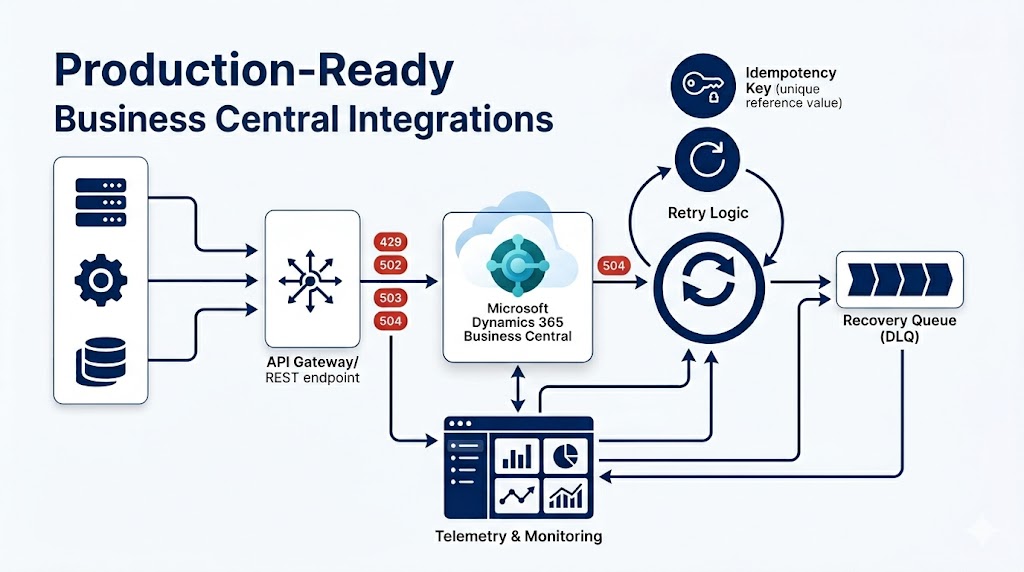
A production-ready Business Central integration needs more than a successful API call. It needs a clear strategy for failure modes, retries, idempotency, and recovery.
The Real Problem
In production, the most dangerous failures are not always the obvious ones.
A validation error is usually clear. Business Central rejects a request because a customer number is missing or a posting date is invalid. You can see the problem immediately and fix it.
The harder cases are the uncertain ones:
- The request reached Business Central, but the response timed out.
- A document header was created, but one of the lines failed.
- The external system retried the same request and created a duplicate.
- Business Central returned a temporary service error.
- A PATCH request failed because the record was changed by another user or process.
- The integration succeeded, but the external system did not store the Business Central ID.
These are not simple API problems. They are integration design problems.
Why Developers Usually Get This Wrong
The common mistake is treating retry logic as the solution to every failure.
That works for some failures, but it can be dangerous for others.
Retrying a failed GET request is usually safe. Retrying a POST request that creates a sales invoice is not automatically safe. If the first request actually succeeded but the response was lost, the retry may create a second invoice.
This is why production integrations should not ask only:
“Should I retry?”
They should ask:
“Do I know what happened?”
If the answer is no, the next step should usually be recovery or verification, not a blind retry.
Business Central API Basics That Matter in Production
Business Central supports REST APIs, OData, and SOAP web services. However, for new production integrations, REST APIs and API pages should normally be the default choice.
A note on SOAP. Microsoft has deprecated publishing Microsoft UI pages as SOAP web services, and this capability is scheduled for removal in Business Central version 29.0. New designs should not rely on SOAP unless there is a strong reason and the deprecation risk is fully understood.
For modern integrations, API pages and API queries are the better choice over exposing standard UI pages as web services. API pages are designed specifically for integration scenarios. They are versioned, webhook-supported, OData v4-enabled REST endpoints and are not displayed in the user interface.
One practical limitation worth knowing: API pages cannot be extended using page extension objects. If you need a different API contract, you create a new API page rather than extending an existing one.
For custom APIs, Microsoft guidance recommends setting the ODataKeyFields property to SystemId. The SystemId field is a unique, immutable GUID assigned to every record. This matters because recovery logic needs a reliable, stable way to find records after a failed or uncertain request.
In summary:
- Use standard APIs when they fit the requirement.
- Use custom API pages when you need a controlled integration contract.
- Avoid exposing UI pages for production integrations.
- Avoid new SOAP-based designs unless the lifecycle risk is understood.
The Failure Modes You Should Design For
A good integration separates failures into categories before writing any retry code. The table below is more important than the retry logic itself. If the integration does not classify failures correctly, it will eventually retry something that should not be retried.
| Failure type | Example | Recommended response |
|---|---|---|
| Validation failure | Missing customer, invalid date, blocked item | Do not retry automatically. Fix the data. |
| Authentication failure | Expired token, wrong permission | Do not retry blindly. Refresh token or fix access. |
| Throttling | HTTP 429 | Cool off and retry later using backoff. |
| Temporary gateway issue | HTTP 502 | Retry according to the Retry-After header when provided. |
| Temporary service issue | HTTP 503 | Retry according to the Retry-After header when provided. |
| Long-running request timeout | HTTP 504 | Refactor or split the request. Retry alone will repeat the same timeout. |
| Concurrency issue | eTag / If-Match mismatch (HTTP 412) | Re-read the record, review changes, then retry if safe. |
| Unknown outcome | Timeout after POST | Check Business Central before retrying. |
| Partial success | Header created, line failed | Recover using correlation data and continue or reverse safely. |
Retry Logic: What Is Safe and What Is Not
Microsoft documents that Business Central online uses throttling limits on web service endpoints and that external applications should handle temporary and throughput-related status codes. These codes should not all be handled the same way.
HTTP 429 — Too Many Requests
The client has exceeded throughput limits. Apply a cool-off period using a backoff strategy such as incremental intervals, exponential backoff, or randomization. Microsoft’s documentation for BC does not document a Retry-After header for 429 specifically, so implement your own backoff logic.
HTTP 502 and 503 — Gateway and Service Issues
Both are temporary platform-level failures. For both codes, Business Central can return a Retry-After header. When this header is present, the client should respect it rather than choosing its own timing. When it is absent, fall back to backoff.
HTTP 504 — Gateway Timeout
This is different from 502 and 503. A 504 means the request took too long to complete — longer than the 10-minute execution limit Business Central enforces. Retrying the same request will likely produce another 504. The correct response is to refactor: split the request into smaller operations, reduce the payload, apply filters, or redesign the integration flow to avoid the timeout in the first place.
A Safe Retry Policy
Regardless of the error type, a retry policy should always include:
- A maximum number of attempts.
- Respect for
Retry-Afterwhen Business Central provides it. - Backoff logic when no explicit retry timing is given.
- Logging for every failed attempt.
- A clear final status after retry exhaustion.
- A recovery path instead of infinite retry loops.
The most important rule is this:
Retry only when the operation is safe to repeat, or when you can first verify the previous attempt did not already succeed.
GET requests are generally safe to retry. PATCH requests require concurrency awareness. POST requests that create business records need idempotency or a recovery check before retrying.
Idempotency: The Missing Design Layer
Idempotency means that sending the same request more than once should not create a different result. If an external system sends invoice EXT-INV-1001 twice, Business Central should not create two invoices.
There is no universal idempotency-key mechanism built into all Business Central APIs. Idempotency should be treated as a practical integration design pattern that you implement, not as a platform guarantee.
The most common approaches are:
- External document number stored on the BC record.
- External system ID mapped to the BC record.
- A dedicated integration reference or tracking table.
- Lookup-before-create logic on every POST.
- The stable Business Central
SystemIdas a post-creation identifier.
The Caller-Provided SystemId Pattern
There is also a platform-supported pattern worth knowing. Microsoft documents that if the SystemId field is specified in a web service POST request, the OData stack will persist that value in the database. This means an external system can pre-generate a GUID, send it as part of the creation request, and later use that same GUID to check whether the record already exists after a timeout or failed response.
This does not make every BC API automatically idempotent. But it gives you a strong and reliable recovery mechanism when you control the API contract and can design around SystemId as a stable, caller-provided identifier.
A practical pattern using this approach:
- External system pre-generates a GUID before sending the request.
- The GUID is included in the POST body as the
id/SystemIdfield. - On timeout or uncertain outcome, the external system queries BC using that same GUID.
- If the record exists, continue from it. If not, retry the creation safely.
Always validate this approach against your specific API endpoint, BC version, and table configuration.
Recovery Is More Important Than Retrying
Retries help when the problem is temporary. Recovery helps when the outcome is unclear.
A production integration should always be able to answer:
- Did Business Central receive the request?
- Was a record created?
- What is the Business Central record ID?
- Was the document fully completed?
- Is the document safe to continue, cancel, delete, or manually review?
- Was the external system updated with the final result?
A Concrete Example
An external system sends a POST request to create a sales invoice. The request succeeds and the invoice header is created, but the response times out before the external system receives the Business Central ID.
A weak integration retries the POST and creates a duplicate invoice.
A stronger integration does this instead:
- Search Business Central using the external invoice reference or the caller-provided
SystemId. - If the invoice exists, continue from that invoice.
- If it does not exist, create it.
- If the invoice exists but is incomplete, route it to a recovery process.
- If the state is still unclear, mark it for manual review rather than guessing.
This is the difference between retry logic and production recovery.
Concurrency: Do Not Ignore eTags
For update and delete operations, Business Central APIs use eTag-style concurrency control through the If-Match request header. A mismatch returns HTTP 412 Precondition Failed. This protects the integration from silently overwriting changes that happened after the record was last read.
In production, concurrency conflicts arise when:
- A user edits the same record manually while the integration runs.
- Another integration or background process updates the same record.
- The integration holds stale data from an earlier read.
When an update fails because of a concurrency conflict, the right response is not always “retry immediately.”
A safer approach:
- Re-read the latest version of the record.
- Compare current values with the intended update.
- Decide whether the update is still valid given the new state.
- Retry only if the business logic still makes sense.
Common Mistakes in Production Integrations
1. Retrying every failure
Not every error deserves a retry. Validation errors (4xx) and permission errors usually need correction, not repetition.
2. Retrying POST without checking Business Central first
This is one of the fastest ways to create duplicate documents. Always verify whether the record already exists before creating it again.
3. Ignoring the Retry-After header
For 502 and 503 responses, Business Central can tell the client exactly when to retry. Ignoring this header and retrying too aggressively makes throttling and service pressure worse.
4. Treating 504 as a normal retry case
A 504 is a signal that the request design is the problem, not just timing. Retrying the same heavy request will produce the same result. Splitting or refactoring is the correct fix.
5. No external reference or controlled identifier
If the external system does not send a unique reference or controlled SystemId, recovery after an uncertain outcome becomes much harder.
6. No integration status tracking
Without a status table or external log, support teams cannot reliably determine what happened. Every integration attempt — not just final failures — should be recorded.
7. Exposing UI pages as APIs
This may work for small or temporary cases, but UI pages can change between BC updates, breaking integrations silently. For production, API pages or API queries are the cleaner and more stable option.
8. Treating telemetry as a recovery mechanism
Telemetry helps you investigate after a failure. It does not replace business-level recovery design. Telemetry can tell you a call failed; it cannot tell you whether a sales invoice or a journal entry was actually committed.
A Practical Decision Guide
| Situation | Action |
|---|---|
| GET failed with temporary error | Retry with backoff. |
| POST timed out | Check by external reference or SystemId before retrying. |
| POST returned validation error (4xx) | Do not retry. Fix the payload. |
| PATCH failed due to stale eTag (HTTP 412) | Re-read the record, compare, then retry if the update is still valid. |
| HTTP 429 returned | Cool off and retry later using backoff. |
| HTTP 502 returned | Retry using the Retry-After header value when provided. |
| HTTP 503 returned | Retry using the Retry-After header value when provided. |
| HTTP 504 returned | Split or refactor the request. Do not retry the same operation unchanged. |
| Record partially created | Move to a recovery flow. Do not assume continuation is safe. |
| State cannot be confirmed | Mark for manual review. Do not guess. |
The goal is not to retry faster. The goal is to avoid making the situation worse.
Debugging and Troubleshooting
When an API integration fails, start with evidence before acting.
Useful information to collect:
- HTTP status code and any
Retry-Afterheader value. - Response body and OData error code.
- Business Central telemetry (the
httpStatusCodeandfailureReasondimensions are the most useful for REST API and OData calls). - Request timestamp, company ID, and environment name.
- API endpoint used.
- External correlation ID or reference.
- Business Central
SystemIdor record ID, if available. - Integration status table or external log entry.
Business Central telemetry is a valuable investigation tool, but it works best when combined with your own business-level tracking. Telemetry can confirm that a call failed or succeeded at the HTTP layer. It cannot tell you whether a sales invoice, journal line, or shipment was actually created from a business perspective. That responsibility belongs to the integration design.
Production Recommendations
For production Business Central API integrations, apply these practices:
- Classify failures before designing retries. Not all errors deserve the same response.
- Never blindly retry document-creating POST requests. Always verify first.
- Distinguish 429 from 502/503 in your retry logic. For 429, use your own backoff. For 502 and 503, respect
Retry-Afterwhen Business Central provides it. - Treat 504 as a design signal, not a retry case. Split or refactor the request to bring it within the execution time limit.
- Always send an external reference, correlation ID, or controlled SystemId. This is the foundation of any recovery strategy.
- Store the Business Central SystemId or record ID after successful creation. You will need it for every subsequent operation and recovery check.
- Use API pages or API queries instead of UI pages. They are more stable, more predictable, and better suited for integration scenarios.
- Avoid new SOAP-based designs against Microsoft UI pages. SOAP on UI pages is deprecated and will be removed in BC version 29.0.
- Use eTags and If-Match properly for updates and deletes. Handle HTTP 412 with a re-read and validation before retrying.
- Add a recovery process for uncertain outcomes. Retry logic handles temporary failures. Recovery handles unknown state.
- Log every attempt, not only final failures. Intermediate states are critical for support and debugging.
- Use telemetry for investigation, not as a recovery mechanism. It is a diagnostic tool, not a substitute for business-level tracking.
- Prefer manual review over unsafe automatic correction when the state is unclear. A paused integration is recoverable. Corrupt or duplicate data often is not.
Conclusion
A Business Central API integration is not production-ready just because the first request succeeds.
Production readiness means the integration can survive throttling, retries, duplicate requests, partial success, concurrency conflicts, long-running requests, and unclear outcomes — without making the situation worse in the process.
The key design shift is simple:
Do not build only for successful API calls. Build for safe recovery when you are not sure what happened.
That is what separates a working integration from a reliable production integration.e production integration.