Architecture assessment and pilot plan, 2 October 2026. I have not tested the native integration in a sandbox.
A customer’s Power BI dashboard refreshes successfully each morning, yet finance says its G/L totals do not match Business Central. The data may have arrived perfectly. An account mapping, join, closing-date filter, or measure can still turn correct entries into the wrong number.
Native mirroring matters because it may simplify the first part of that journey: getting selected Business Central data into Fabric. For developers and consultants, the decision moves toward which data to replicate, how to give it business meaning, and how to prove that the resulting report is right.
What Is Actually New?
Microsoft announced an integration for mirroring selected Business Central tables and company data into OneLake, with an overview and detailed monitoring logs. [1] In Fabric’s documented Open Mirroring model, a source application supplies change data and Fabric materializes queryable tables. [2] A firsthand BC implementation account identifies Open Mirroring as the mechanism behind the announced integration; that account is useful context, but it is not a BC-specific support contract. [3]
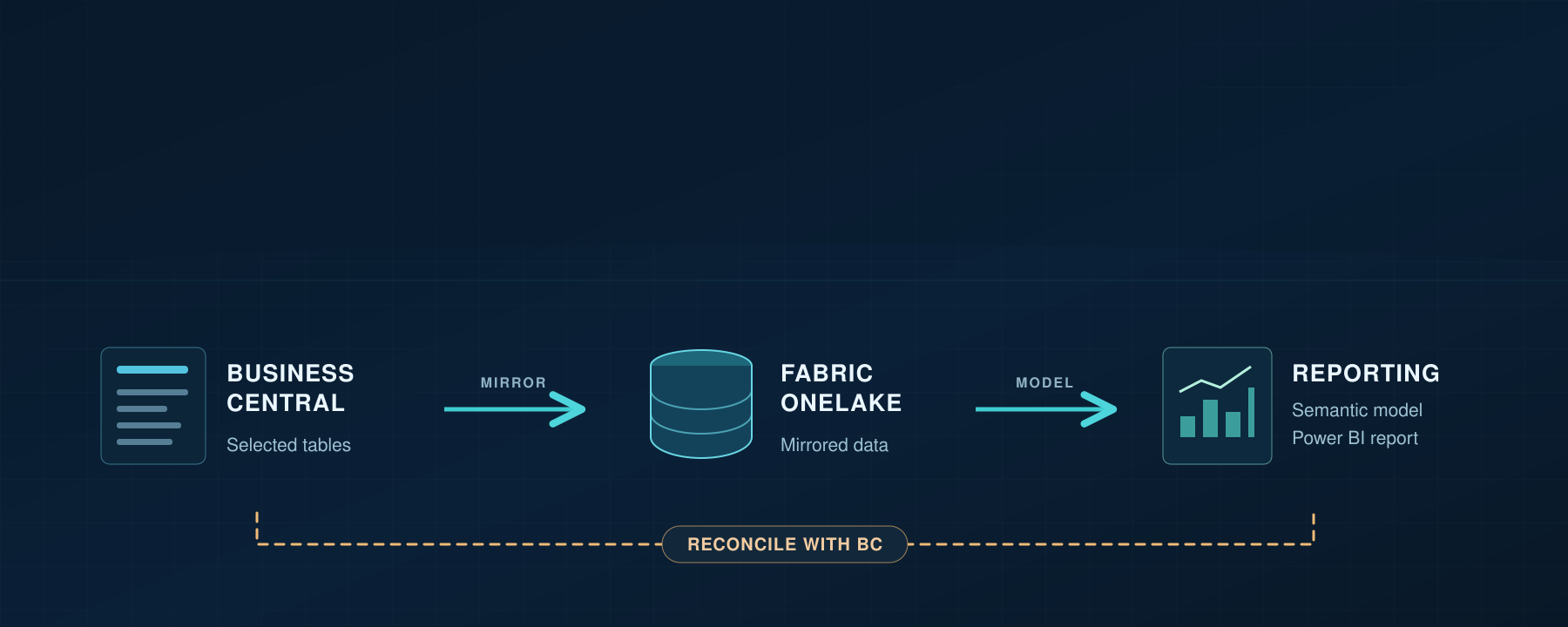
Reconciliation compares the Business Central result with the semantic model output.
The reconciliation step compares the agreed Business Central result with the model output. It is independent of whether the report visual loads. Reporting preparation might be a view, warehouse transformation, or model logic; the diagram does not prescribe another copy of the data.
The announcement establishes the direction of the feature, not every delivery detail. Fabric’s generic Open Mirroring tutorial describes capacity requirements, but those are not the complete BC integration prerequisites. [4] Check the customer’s tenant and current BC-specific documentation before writing a project estimate.
Compare It with the Routes We Already Have
The choice is broader than “custom APIs or native mirroring.” Microsoft already places Fabric among the reporting and integration options for Business Central. [5]
| Route | How BC data reaches analytics | What you still own or must assess |
|---|---|---|
| Standard or custom APIs | A connector or job retrieves chosen entities | Endpoint contracts, pagination and change strategy, scheduling, failures, and analytical modeling |
| bc2adls | A community-maintained BC extension exports incremental data to Azure Data Lake Storage or Fabric. Its documentation includes an Open Mirroring destination. | Configure and operate the extension, its scheduled exports, and the selected destination and model. This is a separate producer from Microsoft’s newly announced native BC setup. [6] |
| BC2Fab workload | Navida’s separate Fabric workload replicates BC data into OneLake through an Open Mirroring architecture, using incremental change detection. | Evaluate its metadata/schema handling, vendor terms, coverage, operational behavior, and model against the customer’s requirements. [7] |
| BC-to-Dataverse synchronization, then Link to Fabric | Selected BC records are synchronized into Dataverse; Dataverse links its eligible tables to Fabric. Existing Azure Synapse Link profiles may also connect to Fabric under documented conditions. | Maintain the BC/Dataverse mappings and assess Dataverse storage and access. Neither path automatically exposes every BC table. [8][9] |
| Announced native BC mirroring | Selected BC company/table data goes to OneLake through the native integration | Verify actual coverage, change semantics, monitoring, and analytical modeling in the tenant. [1][3] |
Dataverse virtual tables expose external data without storing it as ordinary Dataverse rows. They do not support change tracking or Synapse Link export; Link to Fabric selects tables with change tracking. This comparison concerns BC records actually synchronized into Dataverse, not BC virtual tables. [9][10]
Bert Verbeek wrote the native-connection account cited in [3] and maintains the bc2adls fork cited in [6]. Those are two useful perspectives from the same person, not independent corroboration of the new native feature.
Do not assume the new integration supersedes bc2adls or an existing reconciled pipeline. Compare required table coverage, latency, control, operational ownership, cost, and any transformations already working in production.
What Changes for Developers and Consultants?
If native mirroring covers the required data, a team may avoid building custom endpoints solely to move those records into Fabric. It can also shift operational attention from API pagination and extraction checkpoints to replication health and downstream model processing. This is the architectural opportunity, conditional on verified coverage and behavior; it is not a promise of zero maintenance.
The work that remains is substantial. A mirrored G/L Entry table is a source, not a definition of revenue or an income statement. Developers still choose fact grain, relationships, company keys, historical rules, calculation logic, and the security boundary. Consultants still agree which BC screen or report is the acceptance reference and how timing differences are handled.
The default question in a design meeting should change from “How do we extract these records?” to “What do these records mean, and how will we detect when that meaning is wrong?”
Correct Rows Can Still Produce the Wrong Number
Take a small movement report with one G/L entry per fact row, scoped to one company, posting-date interval, and local currency. Microsoft documents Entry No., G/L Account No., Posting Date, Amount, Debit Amount, and Credit Amount on G/L Entry. [11] Use the signed Amount as the source for net movement; show Debit Amount and Credit Amount as separate measures where useful. Do not add debit and credit columns to calculate net movement. The documented BC field names are not a guarantee of the column names produced in Fabric, so inspect the actual mirrored schema before writing queries.
Here is a deliberately hypothetical preparation error. A G/L entry has Amount = 1,250 LCY and appears once in the mirrored source. An account-mapping table contains two matching rows for its company and account. A SQL view or Power Query merge expands that one entry into two rows in the prepared fact, each carrying 1,250 LCY. The measure sums those prepared rows and displays 2,500 LCY. Replication is correct; the preparation step doubled the fact. A duplicate dimension key in a Power BI relationship alone does not establish this result.
Require one active mapping for the intended company-and-account scope, and check fact row counts before and after preparation. If multiple historical mappings are required, define an effective-date rule that selects one mapping per entry. Keep the semantic-model relationship at the intended fact and dimension grain.
Reconcile in three passes: compare entry identities and counts; compare signed Amount by company, account, and period; then compare the semantic model and displayed filters with the agreed BC reference. A zero net total is weak evidence: a missing balanced transaction also has zero net impact. This three-pass approach is my practical recommendation, not a Microsoft-prescribed test procedure.
When the numbers differ, locate the first boundary where they diverge: BC versus mirrored rows, mirrored versus prepared rows, or prepared rows versus the semantic model. Check source environment and company identity for missing entries; check joins, refresh, filters, and measure definitions for entries already in Fabric. If only a consumer sees excessive data, investigate source access, workspace roles, and model security separately.
Year-end needs its own rule. Business Central’s closing process posts entries with closing dates, which differ from ordinary posting dates. [12] A movement report must define whether closing entries are included and how its date dimension represents them. A year-end balance report additionally needs the opening-balance logic. Leaving closing dates out of a pilot can help isolate the first test, but it cannot be the final acceptance policy.
Calculated page values need similar care. FlowFields are calculated at runtime rather than stored as ordinary database fields. [13] If a BC page displays a balance, determine which underlying entries and filters produce it before assuming that a mirrored table has the same value.
Tests to Run in a Pilot
Start in a sandbox with an update and a safe delete. Next check extension coverage and schema changes; these can decide whether the route is suitable for a customized customer. Measure tenant impact, freshness, and recovery in a production-like environment before committing to production. The tests below are proposed checks, not observed results of the new BC integration.
| Area | Small, observable test |
|---|---|
| Initial load and updates | Select a supported low-risk table, record an identifier and initial values, change one value, and compare the BC record with the Fabric row |
| Deletes | In an isolated sandbox, delete a disposable, unreferenced test record; determine whether and when the analytical row disappears or is marked deleted |
| Extension data | Test one extension table and one custom field, including whether the selection UI and resulting schema expose them |
| Schema or app upgrade | Add or change a test field in a sandbox extension and record what happens to the mirrored schema and downstream model |
| Tenant impact | Measure the BC workload and operational signals during initial load and normal changes; do not infer “no impact” from the absence of a custom extraction job |
| Environments and companies | Test a sandbox and production-like environment separately; document the source environment and company identity in every analytical key |
| Freshness and recovery | Record a BC change time, mirrored availability, semantic-model visibility, and report visibility; pause/recover in a safe test and inspect logs |
Use the integration’s own status and Fabric’s replication monitoring to investigate delivery. Fabric documents table/database monitoring signals, including a cumulative “rows replicated” metric that is not simply the present table row count. [14] Generic Open Mirroring behavior does not prove the exact delete, schema, or recovery semantics of this BC producer. Without a measured pilot, I would not state a latency service level or an upgrade guarantee.
Security Is Part of the Report Contract
The BC implementation account describes table-level selection; verify the exact field exposure in the customer’s version before selecting tables with sensitive columns. [3] Hiding a column in a Power BI visual does not govern access to the replicated source. Identify who can administer the Fabric item, query the underlying data, author a semantic model, and view the published report.
Do not assume BC permission sets or security filters propagate into Fabric. In Power BI, row-level security on a semantic model does not restrict workspace Admin, Member, or Contributor roles; test the experience using a Viewer identity that represents a real consumer. [15] This distinction matters especially when a multi-company model is shared across audiences.
When Is Mirroring Worth Considering?
| Customer situation | Design decision |
|---|---|
| Several reports need common BC source tables | Evaluate native coverage and build one governed analytical model |
| BC data must join CRM or other enterprise sources | Evaluate entity matching, company identity, and ownership alongside ingestion |
| Existing extraction is fragile or expensive to maintain | Pilot mirroring against the same acceptance report and compare operations |
| Standard BC reports already answer the question | Assess whether another analytics platform adds enough value |
| A stable pipeline meets freshness and reconciliation requirements | Require a concrete improvement before changing it |
| Strict point-in-time or transaction-consistent reporting is required | Validate that requirement specifically; do not infer it from the mirroring announcement |
Cost the whole route, not just the mirror. Microsoft says core background replication compute does not consume Fabric capacity, while a running capacity is required. Mirrored storage has a capacity-based free allowance, with charges beyond that allowance or when capacity is paused; SQL, Power BI, Spark, and OneLake queries consume capacity at their regular rates. Optional extended mirroring capabilities can add usage-based compute charges if enabled. [16] Add model preparation, Dataverse storage if using that route, BC2Fab vendor terms if applicable, and operational support to the estimate. These generic Fabric meters do not settle any BC-specific entitlement or final customer price.
Conclusion
Native mirroring can reduce extraction work when it supplies the needed BC data. The first decision is whether it meets the customer’s table coverage, change handling, freshness, security, and cost requirements. The second is whether the resulting model matches BC.
For the dashboard that refreshed but disagreed with finance, compare the G/L entry before and after preparation. If the mirrored entry is correct and the prepared fact contains it twice, fix the mapping join. Pilot native mirroring for a specific reporting need when the current extraction burden is material and the pilot passes reconciliation; keep an existing route when it already meets the agreed requirements and the new one offers no measurable improvement.
References
- Microsoft Fabric announcement at FabCon and SQLCon Barcelona 2026 — selected BC data and monitoring announcement.
- Open mirroring in Microsoft Fabric — producer-fed mirroring and cost distinctions.
- Bert Verbeek: Native connection with Fabric in Business Central — firsthand BC implementation context.
- Configure Fabric open mirrored databases — generic Fabric prerequisites.
- Introduction to Fabric and Business Central — reporting context and existing routes.
- bc2adls project documentation — maintained community export options, including Open Mirroring.
- BC2Fab Fabric workload overview — Navida workload architecture and scope.
- Business Central and Dataverse synchronization — selected mappings and synchronization.
- Link Dataverse to Microsoft Fabric — current direct route and comparison with existing Synapse Link.
- Create and edit virtual tables — virtual-table change-tracking limitation.
- Table G/L Entry — documented BC fields and Amount.
- Close income statement accounts — closing-date behavior.
- FlowFields overview — calculated versus stored fields.
- Monitor Fabric mirrored database replication — health signals and row-count interpretation.
- Power BI row-level security — workspace-role boundary.
- Fabric mirroring costs and billing for optional extended capabilities — capacity, storage, query, and optional incremental-processing meters.