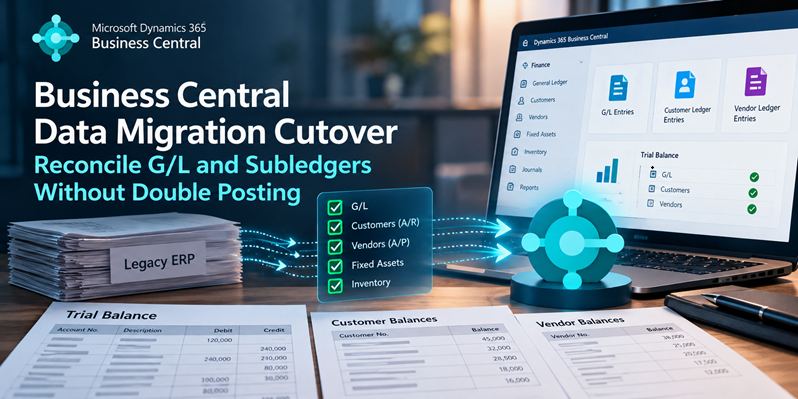
Imagine a Business Central migration that completes without technical errors but leaves the company with incorrect financial balances.
Customer opening entries are posted. Vendor balances match the source files. The general ledger journal is balanced.
Then Finance reviews the opening trial balance and discovers something unexpected.
Accounts Receivable shows 240,000 instead of 120,000. Accounts Payable shows 100,000 instead of 50,000.
Every journal posted successfully. Debits equal credits. But the financial position is wrong.
This illustrative scenario assumes that direct G/L postings to the control accounts were permitted. It shows what can happen when an opening balance is posted twice: once through the subledger and again through the general ledger.
The problem is not necessarily incorrect source data. It is how the financial cutover was designed.
In this article, we’ll examine why double posting happens in Business Central, how to structure opening balance migrations, and how to reconcile the results before go-live.
- Why Opening Balances Get Posted Twice
- Choose the Opening Balance Strategy Before Posting
- Practical Example: Migrating A/R, A/P, and the General Ledger
- Reconcile the G/L and Subledgers Using Standard Business Central Reports
- Common Implementation Traps
- Inventory, Bank, and Fixed Assets Need Separate Reconciliation
- A Related Challenge: Migrating Historical Purchase Invoices
- Cutover Reconciliation and Sign-Off Checklist
- What If an Opening Journal Was Posted Incorrectly?
- Conclusion
Why Opening Balances Get Posted Twice
In Business Central, the general ledger and subledgers are connected through posting groups.
When you post a general journal line to a customer account, Business Central creates the corresponding customer ledger entry and related G/L entries. The receivables account is determined by the Customer Posting Group.
The same principle applies to vendor transactions and their associated payables accounts.
| Opening transaction | Related accounting records |
|---|---|
| Customer opening balance | Customer Ledger Entry and A/R G/L entry |
| Vendor opening balance | Vendor Ledger Entry and A/P G/L entry |
| Bank opening transaction | Bank Account Ledger Entry and related G/L entries |
| Inventory opening transaction | Item Ledger Entry, Value Entries, and associated cost posting |
| Fixed asset opening | FA Ledger Entries, with G/L effects depending on integration setup |
Microsoft documents these relationships in Post Transactions Directly to the General Ledger.
For a deeper explanation, see my article on How Business Central Posting Really Works.
The dangerous assumption
Imagine your legacy ERP has an Accounts Receivable balance of 120,000.
You prepare outstanding customer invoices totaling 120,000 and post them through a general journal.
Business Central creates the customer ledger entries and debits the corresponding receivables G/L account.
If you subsequently import the complete source trial balance, including another 120,000 debit to that same control account—and the account permits direct posting—the balance becomes 240,000.
Both transactions might be individually valid. Together, they represent the same receivable twice.
Business Central does not automatically know that two independently posted opening transactions represent the same legacy balance.
That relationship must be handled by the migration strategy.
Choose the Opening Balance Strategy Before Posting
There are two common approaches to handling the G/L impact of opening subledger transactions.
Approach A: Post subledgers first, then the residual G/L
This is my preferred approach for many custom opening-balance migrations.
The process is:
- Create outstanding customer and vendor opening entries.
- Balance the postings through a dedicated migration clearing account.
- Determine the G/L impact already generated by those transactions.
- Calculate the remaining G/L opening balances.
- Post only those residual amounts.
- Reconcile the source trial balance, target G/L, subledgers, and clearing accounts.
The main advantage is that control-account balances are established through the corresponding subledger postings.
The process does not require additional direct G/L postings to the same A/R and A/P accounts. This allows the Direct Posting setting on those control accounts to remain disabled.
Approach B: Offset subledger G/L effects, then post the complete trial balance
Microsoft’s C5 Data Migration Extension documents another approach under its section on avoiding double posting.
For customer opening transactions, the extension uses the A/R account from the Customer Posting Group as the balancing account. For vendors, it uses the A/P account from the Vendor Posting Group.
The objective is to neutralize the net control-account effect of the opening subledger postings, allowing the general ledger opening process to establish the financial balances separately.
This is an officially documented approach within Microsoft’s C5 migration extension. It should not be assumed that every custom migration has the same posting behavior or permissions.
In a custom journal-based implementation, directly balancing against an A/R or A/P control account generally requires Direct Posting to be permitted on that G/L account. That creates an additional configuration and governance consideration.
Which approach is better?
| Consideration | Residual G/L approach | Offset approach |
|---|---|---|
| Post full source trial balance afterward | No | Yes |
| Net opening balance generated through subledger | Yes | Neutralized by offsetting entries |
| Direct Posting on A/R and A/P | Can remain disabled | Generally required for custom G/L offsets |
| Main calculation | Remaining G/L amount per account | Correct offset per posting group |
| Primary risk | Incorrect residual calculation | Incorrect offsets or weakened posting restrictions |
Both approaches can be valid when properly designed.
For a custom migration with control over the opening journals, I generally prefer the residual G/L approach because it makes the accounting impact easier to trace and avoids temporarily enabling direct posting on control accounts.
Let’s walk through an example.
Practical Example: Migrating A/R, A/P, and the General Ledger
Consider a company migrating from a legacy ERP to Business Central. We have the approved source trial balance and the outstanding customer and vendor documents.
Scope of the example: One company, one local currency, and no new VAT postings. The figures illustrate accounting relationships; they are not results from an executed Business Central environment.
Step 1: Start with the source trial balance
| G/L Account | Debit | Credit |
|---|---|---|
| 1100 — Accounts Receivable | 120,000 | |
| 1300 — Prepaid Expenses | 20,000 | |
| 2100 — Accounts Payable | 50,000 | |
| 2300 — Loan | 40,000 | |
| 3100 — Opening Equity | 50,000 | |
| Total | 140,000 | 140,000 |
The source trial balance balances.
But we must not assume that all these balances should be loaded through a separate G/L journal. Some will already be generated by the customer and vendor opening entries.
Step 2: Create the customer opening entries
The source system contains two outstanding invoices.
| Customer | Document No. | Remaining Amount |
|---|---|---|
| C-001 | INV-1001 | 75,000 |
| C-002 | INV-1002 | 45,000 |
| Total | 120,000 |
We prepare a general journal using the following information:
- Account Type: Customer
- Account No.: C-001 or C-002
- Document Type: Invoice
- Amount: Positive outstanding amount
- Bal. Account Type: G/L Account
- Bal. Account No.: 9990 — Migration Clearing
The expected simplified accounting impact is:
| Account | Debit | Credit |
|---|---|---|
| 1100 — Accounts Receivable | 120,000 | |
| 9990 — Migration Clearing | 120,000 |
Business Central creates the customer ledger entries and the corresponding G/L effect through the customer posting groups.
The receivables account now contains the required 120,000 debit. Notice that we have not posted a separate opening G/L journal to the receivables account.
Step 3: Create the vendor opening entries
The source system contains:
| Vendor | Document No. | Remaining Amount |
|---|---|---|
| V-001 | PINV-2001 | 30,000 |
| V-002 | PINV-2002 | 20,000 |
| Total | 50,000 |
The vendor journal uses the Vendor account type and the same migration clearing account as the balancing account. For a standard opening payable, the amount is entered with the appropriate negative sign.
The simplified accounting effect is:
| Account | Debit | Credit |
|---|---|---|
| 9990 — Migration Clearing | 50,000 | |
| 2100 — Accounts Payable | 50,000 |
After both batches, the clearing account contains:
- Credit from customer openings: 120,000
- Debit from vendor openings: 50,000
- Net balance: 70,000 Credit
This is expected at this stage. The remaining G/L opening journal has not yet been posted.
Step 4: Calculate the residual G/L opening
Here is the important calculation:
Residual G/L posting = Approved source G/L balance − G/L impact already created by opening transactions
The calculation must be performed for each relevant G/L account, using the same accounting date and currency basis.
Accounts Receivable already has 120,000 debit. Accounts Payable already has 50,000 credit. Therefore, neither account requires another opening G/L posting.
The remaining journal becomes:
| Account | Debit | Credit |
|---|---|---|
| 1300 — Prepaid Expenses | 20,000 | |
| 9990 — Migration Clearing | 70,000 | |
| 2300 — Loan | 40,000 | |
| 3100 — Opening Equity | 50,000 | |
| Total | 90,000 | 90,000 |
The debit to Migration Clearing offsets the existing 70,000 credit.
Step 5: Reconcile the final balances
The expected final position is:
| G/L Account | Source Balance | Target Balance | Difference |
|---|---|---|---|
| Accounts Receivable | 120,000 Dr | 120,000 Dr | 0 |
| Prepaid Expenses | 20,000 Dr | 20,000 Dr | 0 |
| Accounts Payable | 50,000 Cr | 50,000 Cr | 0 |
| Loan | 40,000 Cr | 40,000 Cr | 0 |
| Opening Equity | 50,000 Cr | 50,000 Cr | 0 |
| Migration Clearing | 0 | 0 | 0 |
The corresponding outstanding customer entries total 120,000 and vendor entries total 50,000.
In this simplified example, the residual approach reproduces the approved financial opening without duplicating the control-account balances.
What if we posted the complete trial balance again?
Assume the customer and vendor opening entries have already generated the required G/L amounts.
If the complete trial balance is subsequently posted as an additional G/L journal—including direct entries to A/R and A/P with Direct Posting enabled—the accounting result becomes:
| Account | Correct Balance | Duplicated Balance |
|---|---|---|
| Accounts Receivable | 120,000 Dr | 240,000 Dr |
| Accounts Payable | 50,000 Cr | 100,000 Cr |
| Migration Clearing | 0 | 70,000 Cr |
The overall trial balance would still balance. Yet source receivables and payables would be overstated, and the clearing account would remain unresolved.
This is why checking total debits against total credits is not sufficient to validate a financial cutover.
Reconcile the G/L and Subledgers Using Standard Business Central Reports
Business Central provides reports that help identify differences between the general ledger and customer or vendor ledgers. Two are especially relevant during cutover.
Report 5 — Receivables-Payables
Microsoft’s Receivables-Payables report compares customer and vendor balances with the corresponding G/L control accounts.
It supports selecting a posting date and currency. For cutover validation, this makes it particularly useful for comparing the financial position at the agreed opening date.
If the customer ledger contains 120,000 while the receivables control account contains 240,000, that mismatch is the type of discrepancy the report is intended to help identify.
Use the report together with the approved source balances; agreement between BC ledgers alone does not prove the source data was complete.
Report 33 — Reconcile Cust. and Vend. Accs.
Microsoft’s Reconcile Cust. and Vend. Accs. report compares the net change in the general ledger with corresponding customer and vendor ledger movements over a selected period.
It separates transactions by posting group and type and includes relevant currency comparisons. This is useful for investigating accounting differences caused by opening journals.
However, the reporting period must include the migration postings. A clean Report 33 result for the wrong date range proves nothing about the opening position.
Recommended reconciliation checks
| Reconciliation | What it proves |
|---|---|
| Source Trial Balance vs. BC Trial Balance | Target opening G/L position agrees with the approved source |
| Report 5 | Customer/vendor balances agree with corresponding G/L control accounts |
| Report 33 | Relevant period movements reconcile between G/L and subledgers |
| Open document comparison | Individual outstanding documents and amounts are complete |
| Migration Clearing | Temporary offsets are explained and resolved |
I would not sign off a cutover based on only one report.
The strongest control is agreement across the source trial balance, target G/L, subledger totals, and underlying outstanding documents.
Common Implementation Traps
Direct Posting on control accounts
A/R and A/P control accounts should normally be protected against unnecessary direct G/L postings.
Keeping Direct Posting disabled on control accounts doesn’t just protect them in daily use. During cutover, it makes Business Central reject the direct G/L journal posting responsible for the duplicate trial-balance amounts in this example.
That safeguard does not prevent every kind of duplicate migration. For example, posting an opening customer transaction twice can still duplicate the receivable through the subledger.
The residual G/L approach supports keeping Direct Posting disabled because opening balances are established through the customer and vendor postings themselves.
If a custom offsetting strategy requires Direct Posting to be temporarily enabled, control that exception and disable it afterward.
Unexpected VAT posting
A migration clearing account should not create new VAT amounts merely because it is used in an opening journal.
Review the G/L account setup, General Posting Type, VAT posting groups, journal-line settings, and relevant localization requirements.
Microsoft’s Preview Posting functionality lets users review the entries that would be created before posting.
For a historical opening-balance journal that should not generate VAT transactions, verify that Preview Posting shows no unintended VAT entries.
Do not assume that leaving a particular field blank automatically guarantees the correct tax treatment.
Incorrect document and due dates
Outstanding customer and vendor entries need more than the right amount.
Consider an invoice originally issued on 15 August and due on 14 September. If the migration creates an entry with an October due date, the receivables total may still reconcile—but the aging report will be wrong.
Document Date, payment terms, and Due Date must be handled carefully. Depending on field validation and configuration, changing one field may recalculate another. A practical entry sequence is to set Document Date first and Due Date last, then check the finished journal line and posted ledger entry.
Preserve or appropriately represent the original reference, currency, and remaining amount as well. Never rely solely on the dates in the import file.
Foreign-currency valuation differences
Foreign-currency migrations require reconciliation in both the original transaction currency and local currency (LCY).
Suppose a USD invoice remains unpaid at cutover. Its outstanding USD amount may be correct, but its LCY carrying value can depend on historical exchange rates and adjustments already recognized in the source system.
Do not assume the rate configured on the migration date reproduces that value.
Determine the intended opening LCY valuation, validate currency factors and resulting amounts, and account for applicable unrealized exchange-rate adjustments. How the historical valuation is transferred is an accounting and migration design decision—not simply a reason to force a currency factor until the numbers match.
See Set Up Currencies.
Incorrect dimensions
Even when the total G/L amount is correct, the financial distribution can still be wrong.
A receivables balance might reconcile overall while its department or project classification differs from the source.
Check that applicable dimensions are mapped consistently and that the resulting entries satisfy required dimension rules.
For more information, see Understanding Default Dimension Controls in Business Central.
Duplicate journal imports
A repeated import is not necessarily harmless.
Before attempting to post a migration batch again, verify whether the corresponding transactions already exist in the target.
Maintain identifiable journal batches, document references, source extraction versions, and posting records. A new document number does not make a duplicated financial transaction legitimate.
Inventory, Bank, and Fixed Assets Need Separate Reconciliation
The A/R and A/P example explains the main accounting problem, but the same residual journal assumptions cannot simply be applied to every module.
Inventory: Reconcile quantities, value entries, and G/L
Inventory migration requires more than importing correct quantities.
Business Central records quantity movements in Item Ledger Entries and cost information in Value Entries. The corresponding financial amounts must also be reflected correctly in the G/L.
The Inventory – G/L Reconciliation page is particularly useful here.
Microsoft documents that the page compares inventory value entries with the associated G/L totals, identifies differences, supports drill-down, and provides explanations for reconciliation issues.
During cutover, review:
- Item quantities by item and location.
- Opening costs and inventory valuation.
- Cost adjustment status.
- Inventory cost posting to the G/L.
- Reconciliation between value entries and inventory-related G/L accounts.
Where manual inventory cost posting is required, Microsoft recommends running Adjust Cost – Item Entries before Post Inventory Cost to G/L.
Use Reconcile Inventory Costs with the General Ledger alongside the Inventory Valuation report.
For more background, see my Inventory Costing in Business Central article.
Bank: Do not bypass the bank ledger
Microsoft explicitly warns against posting bank opening balances directly to their associated G/L accounts.
Such postings do not create the related bank account ledger entries and can cause reconciliation problems.
A reliable bank cutover should consider:
- Bank account book balance.
- Bank account ledger entries.
- Related G/L account.
- Outstanding checks and deposits.
- Foreign-currency differences.
- The first bank reconciliation after go-live.
The bank statement balance and accounting book balance may legitimately differ because of outstanding transactions.
The objective is to explain those differences, not eliminate them through unsupported adjustments.
See Set Up Bank Accounts.
Fixed assets: Validate G/L integration
Fixed asset migration needs to preserve acquisition cost, accumulated depreciation, and net book value, along with the relevant depreciation configuration.
For Microsoft’s documented first-time fixed asset setup process, opening entries are posted while depreciation-book G/L integration is disabled, after which integration is enabled.
This prevents an unwanted G/L effect when opening balances are being established separately.
However, the exact procedure must be evaluated according to the migration scope and existing company setup.
See Set Up General Fixed Assets Information.
A Related Challenge: Migrating Historical Purchase Invoices
Another migration scenario occurs when an organization needs to retain historical purchase invoices rather than migrate only outstanding payables.
For example, a migration might represent selected legacy purchase invoices through journal vouchers and retain the original invoice PDFs as supporting documents.
This is a different requirement from migrating open A/P balances.
Before choosing this approach, determine:
- Whether each historical invoice is paid, partially paid, or outstanding.
- Whether the target requires an open vendor ledger entry or only a record of historical expenditure.
- Whether historical G/L balances have already been included in the opening position.
- Whether VAT history must remain available for reporting.
- How original references and supporting documents will be preserved.
- Whether the selected posting and attachment approach meets audit requirements.
A journal voucher with supporting documentation does not reproduce the complete functionality or history of an original posted purchase invoice.
Posting historical expenses again without considering the opening G/L can also create unwanted duplication.
The accounting and document-retention requirements should determine the migration design—not the convenience of importing journal lines.
Cutover Reconciliation and Sign-Off Checklist
Before approving the financial cutover, I recommend the following controls.
| Area | Required validation |
|---|---|
| Source data | Approved trial balance and subledger extracts at a defined cutoff |
| G/L | Every opening account reconciles to the source |
| A/R and A/P | Reports 5 and 33, plus outstanding document reconciliation |
| Clearing accounts | Zero balance or explicitly documented and approved exception |
| Document dates | Original dates, due dates, and aging behavior validated |
| Currency | Original currency and LCY balances reconcile |
| Inventory | Quantity, valuation, and inventory-to-G/L reconciliation |
| Bank | Bank ledger, G/L, and outstanding transactions reconcile |
| Fixed assets | Acquisition, depreciation, and net book values reconcile |
| Dimensions | Required classifications agree with source mappings |
| Duplicate control | Opening batches and posted transactions are identifiable |
| Operational readiness | Representative payments, applications, and operational postings behave correctly |
| Finance approval | Material balances and exceptions are formally accepted |
The cutoff date and source extraction version must be clear. Otherwise, a difference may reflect transactions included in one system but excluded from the other.
When should you stop the cutover?
Examples of conditions that should prevent financial sign-off include:
- Unexplained A/R or A/P control-account differences.
- Incorrect outstanding customer or vendor documents.
- Unresolved migration clearing balances.
- Material inventory valuation discrepancies.
- Unexpected VAT or currency effects.
- Incorrect customer aging or payment application behavior.
- Missing approval of financial adjustments.
Do not post an unexplained G/L adjustment merely to force the final figures to match. That might hide the actual migration problem.
What If an Opening Journal Was Posted Incorrectly?
A posting mistake during cutover requires careful correction.
Business Central provides journal reversal functionality, but it has limitations.
Microsoft documents that the standard Reverse Transaction feature applies to qualifying entries originating from general journals and that an entry can only be reversed once.
An important limitation is that the documented reversal feature cannot be used when an additional reporting currency (ACY) is in use; Microsoft directs users to manual reversal in that situation.
Subsequent applications and other transactions can also affect the available correction process.
See Reverse Journal Postings and Undo Receipts/Shipments.
For a financial cutover, define the recovery approach before posting begins. Do not assume that posted ledger entries can simply be deleted or that every incorrect posting can be reversed through the same process.
Conclusion
A Business Central data migration is not complete when all the records have been imported.
It is complete when the resulting financial position can be reconciled and explained.
The most important principle is:
Each opening financial balance must be represented exactly once in the final G/L, while preserving the subledger detail needed for ongoing operations.
Understand the posting impact of each migration process before loading the remaining general ledger balances.
Use standard reconciliation reports, validate individual outstanding documents, review inventory and bank accounting separately, and obtain Finance approval before go-live.
A balanced trial balance tells you that debits equal credits.
A reconciled cutover tells you that the financial position is correct.