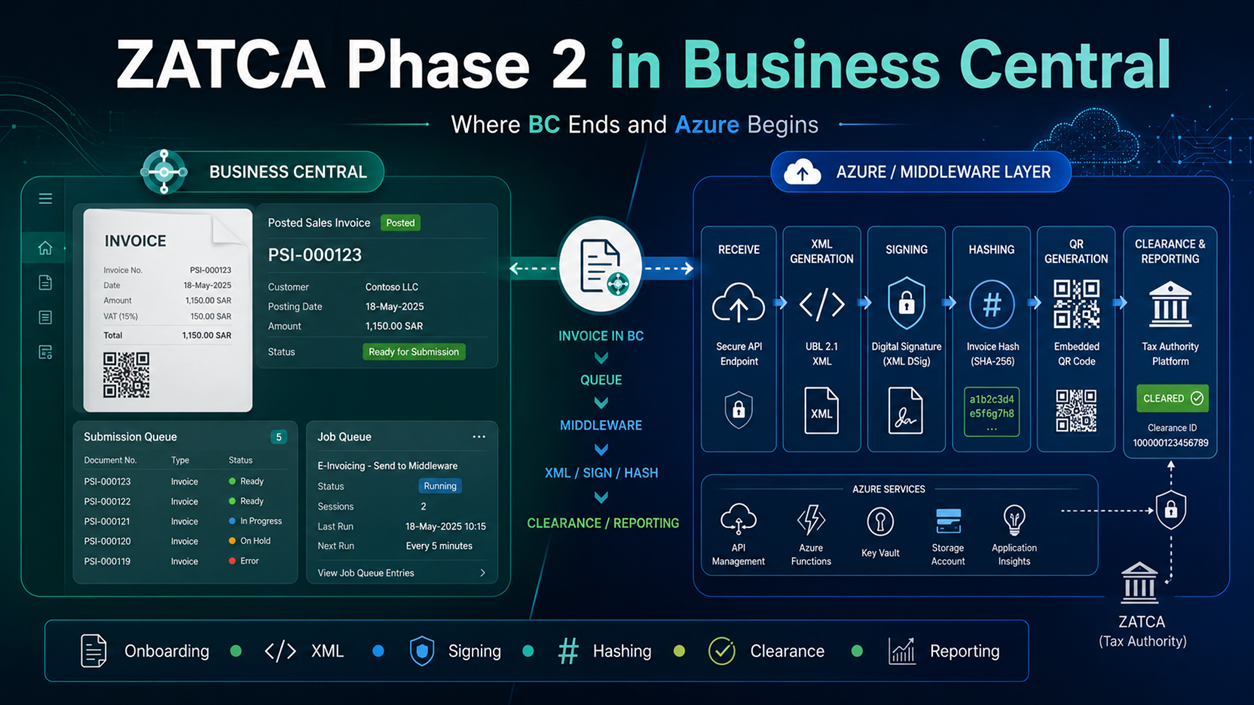
If you think ZATCA Phase 2 in Business Central is “add a QR code to the invoice layout,” stop. That’s the misconception that gets projects into trouble three months after go-live, not during the demo.
The real requirement is a full e-invoicing pipeline wrapped around BC: onboarding, XML generation, cryptographic stamping, invoice hashing, submission, response handling, audit storage, retries. BC can own a meaningful chunk of that. It should not be forced to own all of it.
First, kill the wrong assumption
Business Central does not ship native ZATCA Phase 2 compliance in the base app. Microsoft lists Saudi Arabia as Partner-localized, not Microsoft-delivered — meaning partners build the localization on top of the international W1 version. The Microsoft ZATCA documentation that does exist — onboarding, clearance/reporting, CSID lifecycle — sits under Dynamics 365 Finance, and Commerce has its own version for POS-generated simplified invoices. Neither is Business Central. Both are useful as conceptual reference — but don’t hand a client a Finance or Commerce doc and call it your BC architecture.
Forget B2B/B2C — use ZATCA’s own split
The distinction that actually drives your design isn’t B2B vs. B2C. It’s this:
| Invoice type | ZATCA process | Who stamps it |
|---|---|---|
| Tax Invoice (standard) | Clearance — ZATCA validates and stamps before you share it with the buyer | ZATCA’s platform |
| Simplified Tax Invoice (retail/POS) | Reporting — you stamp it yourself, share it immediately, report to ZATCA within 24h | Your own EGS |
Design around “does this need clearance or reporting,” not “is this a business customer or a walk-in.”
One nuance worth building in from day one: simplified invoices aren’t strictly B2C. ZATCA’s own guidelines allow a simplified invoice for a B2B transaction when the taxable supply is under SAR 1,000. Don’t hardcode “B2B → clearance, B2C → reporting.” Determine the ZATCA invoice type first, based on the actual rule, then route to clearance or reporting from that — not from the customer type on the sales header.
Onboarding comes first — it’s part of the architecture, not a prerequisite to it
Before BC submits anything, the EGS has to be onboarded, and that process defines the certificate/device identity that later controls ICV, PIH, signing, and submission behavior. In practice:
- Confirm VAT registration, company/branch structure, and which invoice types the EGS will issue.
- Generate the CSR and request the Compliance CSID using the OTP from the Fatoora portal.
- Submit the required compliance sample invoices — standard and simplified, invoice/debit/credit as applicable.
- Obtain the Production CSID once compliance checks pass.
- Configure BC: active company, environment, EGS reference, middleware URL, device status.
- Post the invoice in BC, which creates a submission queue entry.
- Middleware generates the final XML, signs, hashes, creates the QR, and calls ZATCA.
- BC gets updated: cleared (standard) or reported/failed (simplified).
This mirrors the CCSID → compliance checks → PCSID sequence Microsoft documents for Dynamics 365 Finance’s Saudi onboarding — useful as a conceptual reference, not as BC-native functionality.
The one architectural rule that matters
Business Central owns the business process. Everything that touches the actual XML — canonicalization, signing, hashing, QR generation, the ZATCA API call itself — lives in one external component, end to end.
Not “BC generates draft XML and Azure signs it.” Not “middleware step 1 does canonicalization, middleware step 2 does hashing.” One component, one pass, no handoffs in the middle.
I’m not saying this in theory. On a ZATCA integration extension I built, invoices were coming back with hash mismatches — intermittently, not on every invoice, which is the worst kind of bug to chase. Root cause: the signed XML was passing through a Blob-to-Text round trip inside BC between generation and submission, and that round trip was silently normalizing CRLF line endings and converting tab characters. Same content, different bytes. Different bytes, different hash. ZATCA doesn’t care that the content is identical — the signature is over the exact byte sequence.
The fix wasn’t a smarter hashing function. It was architectural: sanitize free-text fields before they ever touch the XML, have the middleware return the signed XML as base64 plus a pre-computed hash, and store it in BC as a plain, immutable Text field — never let BC’s own Blob/Text conversion touch the signed payload again. In my case, the immutable Text approach solved the mutation issue. For larger payloads, I’d still store the payload externally in Blob Storage and keep only the immutable reference plus hash in BC, for the same reason: a reference is just a string, and it was never the thing being mutated. Once the signed bytes leave the signing component, nothing is allowed to reformat them — that’s the non-negotiable part, not which field type holds them.
That’s the whole argument for keeping XML generation, signing, and hashing in one place. Every extra hop is a chance for something — a stream encoding, a text field, a serialization step — to quietly rewrite bytes you already signed.
What belongs where
| Business Central | External (Azure Function / middleware) |
|---|---|
| Posted invoice/credit memo as source of truth | Final XML generation and canonicalization |
| ZATCA setup (company, VAT no., environment, EGS reference) | Digital signing, invoice hash, previous-invoice-hash chain |
| Submission queue + attempt log | QR generation |
| Job Queue dispatcher and retry scheduling | ZATCA clearance/reporting API calls |
| Status, UUID, QR, and response shown to users | Certificate and private key storage (Key Vault) |
| Request/response/XML archive (Blob Storage) |
The flow, compressed
Post invoice in BC
   → Create submission queue entry (Pending)
   → Job Queue picks it up, calls middleware
   → Middleware generates XML, canonicalizes, signs, hashes, calls ZATCA
   → Response + evidence stored (Blob)
   → BC updated: status, UUID, hash, QR
   → Failed? Job Queue retries on schedule; business rejections need a human
Don’t let posting in BC imply ZATCA accepted the invoice. Posting and clearance are two different events — collapsing them is how you end up blocking sales because an API was slow.
Run that dispatcher through Job Queue, not a user staring at a page spinner. Microsoft documents Job Queue as running in background sessions with its own failure path — jobs get rescheduled or flagged in error, not left hanging on a UI thread. Test the Job Queue user without SUPER permissions, log every attempt, and surface failed or rejected entries somewhere a human will actually see them.
Three mistakes that actually happen
Treating B2B and B2C the same. One is clearance-driven, one is reporting-driven. Different timing, different failure mode, different retry logic.
Letting AL become the ZATCA engine. HttpClient can call anything. That doesn’t mean canonicalization and XAdES signing belong in AL — external crypto libraries are better tested and easier to patch than anything you’d hand-roll in AL.
Storing only the final status. “Accepted” or “Rejected” tells your support team nothing. Store every attempt, what was sent, what came back, and which certificate signed it — you will need it the first time a client disputes a rejected invoice.
Bottom line
Business Central controls the business process — who posted what, when, and what happened to it. Azure controls the technical compliance process — the bytes, the signature, the hash chain. Keep that boundary sharp, and keep the signed payload untouched from the moment it’s signed to the moment it’s submitted. Everything else in this architecture is detail.