A common production complaint sounds like this:
“Both extensions work correctly when we test them separately. When we install them together, the result changes.”
Sometimes a validation disappears. Sometimes the same integration record is created twice. Sometimes a standard posting step stops running. In other cases, there is no functional error at all—the process simply becomes much slower after another app is installed.
The first question is usually:
“Which event subscriber runs first?”
That is the wrong question.
Business Central can execute multiple subscribers for the same event, but Microsoft explicitly documents that subscribers run one at a time in no particular order. You cannot assign a priority or require one automatic subscriber to run before another.
The real problem is not that two extensions use the same event.
The real problem is that they share an execution path without sharing an ownership model.
That becomes especially dangerous when IsHandled is involved.
- The Conflict Is Not the Event—It Is Missing Ownership
- Why Subscriber Order Cannot Be Your Design
- The Five Conflicts I Look for First
- Why IsHandled Is More Dangerous Than It Looks
- A Composite Production Incident
- How to Diagnose the Conflict Without Guessing
- What Isolated Events Solve—and What They Do Not
- Do Not Fix This by Trying to Control Subscriber Order
- Decision Guide
- When IsHandled Is Still Unavoidable
- Conclusion: Make Ownership Explicit
The Conflict Is Not the Event—It Is Missing Ownership
Events are one of the foundations of Business Central extensibility.
They let Microsoft, ISVs, and per-tenant extensions add behaviour without directly modifying the application that publishes the event. A publisher raises an event, and any installed extension with a matching subscriber can react.
That loose coupling is useful. It is also easy to misunderstand.
Imagine a customer has three extensions installed:
- A compliance app that changes a posting decision.
- A warehouse app that adds validation.
- An integration app that creates an outbound queue entry.
Each app may be technically correct on its own. But when the same transaction passes through all three extensions, their combined behaviour may not have been designed by anyone.
One subscriber can change a var parameter that another subscriber receives later. Two subscribers can create the same side effect. One can raise an error based on a state introduced by another. A broad IsHandled subscriber can exit standard processing before an event required by another extension is ever raised.
Business Central executes the subscribers.
It does not resolve the business ownership between them.
Why Subscriber Order Cannot Be Your Design
When I investigate an extension conflict, I may use breakpoints to see which subscriber ran first in that specific execution.
That is useful evidence for understanding what happened.
It is not a supported design contract.
Microsoft documents two important facts:
- More than one subscriber can subscribe to the same event.
- Their execution order cannot be specified.
This means you should not depend on:
- App installation order.
- App publication order.
- Object or codeunit IDs.
- Marketplace app versus per-tenant extension.
- The order shown during one debugging session.
- A dependency declared in
app.json.
An app dependency ensures that one extension can reference objects exposed by another. It does not assign event-subscriber priority.
If Extension B requires Extension A to complete first, then the relationship is not truly event-driven. It is an ordered business workflow, and that order should be represented explicitly.
The Five Conflicts I Look for First
Not every event with multiple subscribers is a problem.
Several subscribers can safely react to an event when their work is independent. One may add telemetry, another may populate an extension-specific audit table, and another may create a notification.
A collision starts when their responsibilities overlap or their assumptions become incompatible.
1. Competing IsHandled Subscribers
Two subscribers both believe they own the same operation.
For example:
- Two apps replace the same calculation.
- Two apps decide which external provider to use.
- Two apps override the same validation.
- Two apps replace the same page action.
- Two apps intercept the same posting step.
Both subscribers may correctly check IsHandled and exit when it is already true.
The design can still be unsafe.
If both subscribers’ conditions match the same record, whichever one runs first effectively wins. Because subscriber order is unspecified, the business rule has no explicit owner.
A concrete case: two apps subscribe to the same handled event. One checks
if CopyStr(DocumentNo, 1, 1) <> 'S' then exit;before claiming ownership. The other checksif StrLen(DocumentNo) <= 10 then exit;. Both guard clauses are correctly written — checkIsHandled, match a condition, setIsHandled := true. Now process document numberSALES-2026-001. It satisfies both conditions. Whichever extension’s subscriber the platform happens to invoke first wins, and the other silently exits. Neither developer wrote a bug. Nobody wrote the rule that decides which business logic should apply to that document. That’s the whole problem in one document number.
2. Conflicting var Mutations
Events often expose records, Boolean flags, results, filters, temporary records, or other parameters by reference.
That allows a subscriber to contribute to the result. It also creates shared mutable state.
One subscriber may:
- Change a field that another subscriber later validates.
- Replace a result calculated by an earlier subscriber.
- Add or remove filters.
- Modify a temporary record expected by another app.
- Change a Boolean decision used by the publisher.
No runtime error is required. The final value may simply depend on which subscriber modified it last.
3. Duplicate Side Effects
Two extensions independently create the same business effect:
- An integration queue entry.
- An email or notification.
- A document attachment.
- An audit entry.
- A related document.
- An HTTP request.
The event completes successfully, but the external system receives the same transaction twice.
This is not primarily an ordering problem. It is an ownership and idempotency problem.
If multiple extensions can react to the same business event, each side effect needs a clear business key and duplicate-prevention strategy.
4. Downstream Events That Disappear
This is the conflict that usually takes the longest to find.
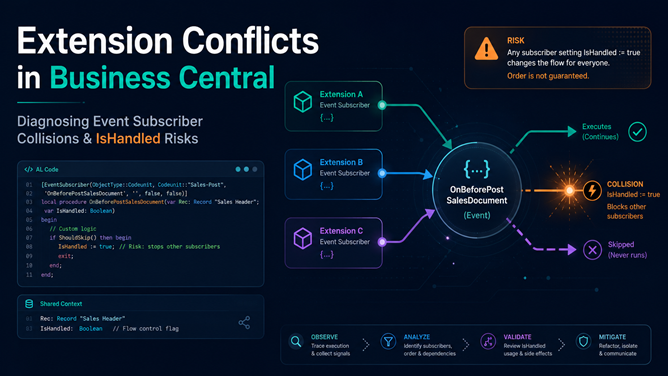
Extension A subscribes to a broad OnBefore... event and sets IsHandled := true. The publisher exits.
The standard code after that point never runs.
That skipped code may have contained another event publisher used by Extension B. Extension B is not necessarily subscribed to the original IsHandled event. Its event simply disappears from the execution path.
Microsoft identifies this as one of the main risks of the pattern: skipping standard code can prevent other events from being raised and break extensions that depend on them.
The team responsible for Extension B may spend hours checking permissions, setup, APIs, and Job Queue entries even though its subscriber was never reached.
5. Performance Amplification
Sometimes every subscriber is logically correct.
There are simply too many of them doing too much work.
A subscriber that adds 40 milliseconds may look harmless in isolation. If ten subscribers run for every line in a posting process, that cost becomes visible.
The problem becomes worse when subscribers:
- Read broad datasets.
- Calculate expensive FlowFields.
- Call
LockTable. - Make synchronous HTTP requests.
- Insert records inside loops.
- Repeat setup reads.
- Run during API, posting, or session-start flows.
Long-running AL method telemetry can include extension-level timing and subscriber execution counts, helping identify which installed extensions contributed to a slow operation.
The signal proves where time was spent. It does not automatically prove that the extensions are logically incompatible.
Why IsHandled Is More Dangerous Than It Looks
A simplified handled publisher usually looks like this:
codeunit 50100 "Document Processor"
{
    procedure Process(DocumentNo: Code[20]): Text[100]
    var
        Result: Text[100];
        IsHandled: Boolean;
    begin
        OnBeforeProcess(DocumentNo, Result, IsHandled);
        if IsHandled then
            exit(Result);

        Result := StrSubstNo(
            'Standard processing completed for %1.',
            DocumentNo);

        exit(Result);
    end;

    [IntegrationEvent(false, false)]
    local procedure OnBeforeProcess(
        DocumentNo: Code[20];
        var Result: Text[100];
        var IsHandled: Boolean)
    begin
    end;
}
A subscriber following the documented convention starts by checking whether another subscriber has already handled the event:
[EventSubscriber(
    ObjectType::Codeunit,
    Codeunit::"Document Processor",
    'OnBeforeProcess',
    '',
    false,
    false)]
local procedure HandlePriorityDocument(
    DocumentNo: Code[20];
    var Result: Text[100];
    var IsHandled: Boolean)
begin
    if IsHandled then
        exit;

    if not DocumentNo.StartsWith('PRIORITY') then
        exit;

    Result := StrSubstNo(
        'Priority processing completed for %1.',
        DocumentNo);

    IsHandled := true;
end;
The immediate guard clause is important. A subscriber should not modify data, call an external service, or create a side effect before checking whether the operation was already handled.
But the guard clause does not resolve competing ownership.
Microsoft’s guidance explains that IsHandled is based on convention rather than enforcement. AL does not stop a subscriber from ignoring the existing value, resetting it, or performing work before checking it. The pattern also assumes that only one subscriber should effectively handle the request.
That is a weak contract for a multi-extension environment.
The Boolean is not a lock.
It is not an owner token.
It is shared state whose meaning depends on every installed subscriber following the same convention.
The larger problem is what happens after the publisher checks it. If IsHandled skips a large block, the extension may be replacing far more than the developer intended:
- Standard validation.
- Record initialisation.
- Number assignment.
- Dimension processing.
- Permission checks.
- Downstream events.
- Cleanup logic.
- Standard telemetry.
Microsoft now recommends limiting IsHandled to a bare minimum, preferring clearer extensibility patterns, and documenting why a new handled event is necessary.
A Composite Production Incident
The following is a composite scenario based on a pattern that appears in multi-extension implementations. It is not tied to one named customer or one specific Microsoft event publisher.
A distribution company running two AppSource apps hit this during a normal week, not a migration or an upgrade window.
The first was a compliance app. It replaced part of a document-processing flow through a broad OnBefore... event with an IsHandled parameter.
The second was an integration app. After the document completed standard processing, it created an outbound queue entry that was later sent to an external platform.
Both apps passed isolated testing:
- With the compliance app installed, the document posted correctly.
- With the integration app installed, the outbound queue entry was created.
- No compilation errors appeared when both apps were installed.
- The posting process itself completed successfully.
In the combined environment, the document posted but no integration queue entry appeared.
Finance noticed first — the count of vendor invoices still “awaiting external confirmation” kept climbing instead of clearing. The first investigation focused on the integration app:
- Was the Job Queue entry enabled?
- Did the user have permission to insert the queue record?
- Was the external endpoint reachable?
- Had the record already been processed?
- Did the integration setup match the company?
Everything looked correct.
The real failure happened earlier.
The compliance subscriber matched the document, completed its replacement logic, set IsHandled := true, and caused the publisher to exit the standard branch. The event used by the integration extension existed inside that skipped branch.
The integration subscriber did not fail.
It never ran.
This is why extension conflicts are difficult to diagnose from the visible symptom. The extension that appears broken may only be the downstream victim.
How to Diagnose the Conflict Without Guessing
The goal is not to find a random workaround that makes the current environment pass.
The goal is to identify where ownership, state, or execution path diverges.
1. Reproduce the Real Entry Point
Start with the exact route used in production:
- Page action.
- Field validation.
- Posting process.
- API call.
- OData request.
- Job Queue entry.
- Report.
- Background session.
- Install or upgrade code.
The same business operation can follow different AL paths depending on how it starts.
Capture:
- Environment and Business Central version.
- Company.
- User or service identity.
- Installed app versions.
- Exact action and record.
- Timestamp.
- Whether the issue started after an update.
- Whether the result is consistent or intermittent.
Do not reproduce a page problem through a test codeunit and assume the execution path is identical.
2. Compare the Event Paths
Use Event Recorder in the same session as the failing action.
I normally compare at least two runs:
- A working environment or app combination.
- The affected extension combination.
Look for the point where the paths diverge:
- An event exists in the working run but is missing in the failing run.
- The flow stops shortly after a broad
OnBeforeevent. - The same event is raised more than once.
- A different publisher path is used for the same apparent action.
- The expected downstream event never appears.
Event Recorder captures events raised in the current session, displays them in call order, and can generate subscriber snippets. Its results are not retained after the page is refreshed.
What it does not prove is equally important.
It does not establish a guaranteed subscriber order, show every internal variable change, or explain why a subscriber set IsHandled.
Use it to map the event path—not to declare which subscriber should have priority.
3. Identify the Installed Extensions in the Flow
When the issue starts from a page, page inspection is a useful first filter.
The Extensions tab can identify apps that extend the page or source table. Its performance information can also show time attributed to an extension in the call stack and the number of event subscribers executed.
That does not provide a complete map of every app involved. A codeunit subscriber can affect the process without adding anything visible to the page.
Still, it helps answer an important question:
Which extensions should be included in the investigation?
For source code you control, search for subscribers to:
- The publisher where the paths diverge.
- Events immediately before and after that point.
- Related table trigger events.
IsHandled,Handled,Success, or result parameters.- Fields whose values differ between environments.
For every relevant subscriber, document:
- When its condition matches.
- Which parameters it changes.
- Which records it inserts or modifies.
- Whether it raises an error.
- Whether it performs external work.
- Whether it sets
IsHandled. - Which later standard code it assumes will still run.
4. Break at the Ownership Decision
Do not place a breakpoint only inside your subscriber.
Place it at the publisher and the decision immediately after the event:
OnBeforeProcess(DocumentNo, Result, IsHandled);

if IsHandled then
    exit(Result);
Then inspect:
- The initial value of
IsHandled. - Which subscriber changes it.
- The values of shared
varparameters. - The call stack.
- The state before and after subscribers you control.
- Whether the next expected publisher is reached.
Finding the first subscriber is not the end of the diagnosis.
Ask the more important question:
Why does this design require that subscriber to run first?
If the answer is “because the other app expects its result,” the architecture needs an explicit dependency or orchestrator.
5. Test the Installed Combination
Create a sandbox matching the production application and extension versions.
Then test the minimum combinations:
| Test | Extension A | Extension B | Purpose |
|---|---|---|---|
| Baseline | No | No | Confirm standard behaviour |
| A only | Yes | No | Confirm Extension A independently |
| B only | No | Yes | Confirm Extension B independently |
| Combined | Yes | Yes | Reproduce the interaction |
This is practical diagnostic guidance, not a built-in collision-detection feature.
Use a disposable or controlled sandbox. Uninstalling apps can affect dependent extensions and retained extension data, so do not perform destructive isolation tests directly in production.
If the issue appears only in the combined test, you have evidence of an interaction rather than a general defect in either app.
6. Add Telemetry to Subscribers You Own
For critical subscribers, log the decision—not every line.
Useful telemetry points include:
- Subscriber entered.
- Preconditions matched.
- Request was already handled.
- Subscriber claimed ownership.
- Subscriber skipped.
- Implementation or mode selected.
- Operation completed.
- Duration.
- Correlation identifier.
That makes an invisible event decision visible after the incident.
For a complete approach to custom dimensions, Session.LogMessage, Feature Telemetry, KQL, and production alerts, see AL Telemetry in Business Central: What to Instrument, How to Query It, and When to Alert.
For performance-related collisions, long-running AL method telemetry can show how much individual extensions and their subscribers contributed to the operation. Availability and thresholds differ by Business Central version and deployment type, so verify the behaviour in the target environment.
Telemetry will not resolve the ownership conflict.
It will stop you from diagnosing it blindly.
What Isolated Events Solve—and What They Do Not
Isolated events deserve a place in this discussion, but they solve a specific problem.
A business, integration, or internal event can be declared as isolated by the publisher. Each subscriber then runs in its own transaction. If one subscriber raises an error, its normal-table changes can be rolled back, and Business Central can continue with the next subscriber.
This is useful when subscribers are independent and one extension’s failure should not stop the complete process.
Microsoft uses this idea for critical flows such as OnAfterLogin, where a failing subscriber should not normally prevent the user from signing in.
However, isolated events come with important boundaries:
- You must control the publisher or consume an event already declared as isolated.
- A subscriber cannot make an existing normal Microsoft event isolated.
- Write transactions should be committed before raising an isolated event; otherwise, subscriber errors can still fail the surrounding operation.
- Successful subscriber transactions are committed separately.
- Record changes to normal tables can be rolled back when a subscriber fails, but HTTP calls, variable mutations, and single-instance state are not automatically reversed.
- During extension installation, uninstallation, and upgrades, isolated events run as normal events rather than in separate transactions.
Most importantly:
Isolation contains subscriber failure. It does not resolve subscriber disagreement.
Two isolated subscribers can still:
- Make contradictory business decisions.
- Create duplicate external requests.
- Modify the same
varparameter. - Compete for ownership.
- Produce an incorrect combined result while both complete successfully.
Use isolated events when independent subscriber failures should not stop the publisher and the transaction boundaries are acceptable.
Do not use them as a substitute for an ownership model.
Do Not Fix This by Trying to Control Subscriber Order
Once the conflict is understood, the tempting fix is often:
“Can we force our subscriber to run before the other extension?”
That is usually an attempt to preserve an architecture that should be changed.
Even if you find an order that works today, the design remains dependent on unsupported behaviour.
Instead, identify the type of relationship the extensions actually need.
When Multiple Extensions Should Contribute
Use a positive, additive event with a clear purpose.
Examples include:
- Add additional filters.
- Add a candidate.
- Add a validation message.
- Enrich a temporary buffer.
- Register a provider.
- React after a completed state change.
A specific event such as OnAddAdditionalFilters communicates a clearer contract than a broad OnBeforeProcess(var IsHandled).
Microsoft similarly recommends regular events that add functionality rather than events that skip standard logic.
When Exactly One Implementation Should Run
Use an explicit implementation-selection model.
An AL interface, extensible enum, setup value, or orchestrator can make the decision visible:
- Which implementation was selected?
- Who selected it?
- What contract must it implement?
- What happens when another app adds an implementation?
- What is the default?
This is safer than allowing several automatic subscribers to compete for IsHandled.
For the full pattern, see AL Interfaces: The Feature Most Business Central Developers Ignore.
When Sequence Matters
Use explicit orchestration.
If the required process is:
Validate → Enrich → Calculate → Persist → Notify
then one component should own that sequence.
Events can still exist around the steps, but the required order should not be inferred from the order of unrelated automatic subscribers.
When the Process Is Materially Different
Consider a separate action or module.
If an extension needs to replace most of a standard process, adding several broad handled subscribers may create more fragility than exposing a clearly separate operation.
Microsoft’s IsHandled guidance recommends separate actions or implementations when the customisation is large and the boundary can be made explicit.
When Only a Small Operation Must Be Skipped
Skip as little as possible.
A narrow skip event around a few visible lines is safer than an event that bypasses a complete posting or validation routine.
Do not skip standard validation unless the entire downstream impact is understood and intentionally replaced.
Decision Guide
| Requirement | Preferred direction |
|---|---|
| Several independent extensions need notification | Regular after-event |
| Extensions need to add filters, data, or validation | Positive additive event |
| One small operation may be skipped | Narrow skip event |
| Exactly one implementation must be selected | Interface or explicit provider selection |
| Several operations must run in a defined order | Explicit orchestrator |
| One subscriber failure must not stop independent subscribers | Isolated event, after transaction review |
| The custom process is materially different | Separate action or module |
| A large standard process must be bypassed | IsHandled only as a documented last resort |
| One automatic subscriber must run before another | Redesign; there is no supported priority mechanism |
When IsHandled Is Still Unavoidable
There are situations where the existing application exposes only a handled event and no safer extensibility point.
When that happens:
- Check
IsHandledbefore any side effect. - Never reset it to
false. - Make the matching condition as narrow as possible.
- Skip the smallest practical section of standard code.
- Identify the standard validations being bypassed.
- Identify downstream events that will no longer be raised.
- Confirm that another installed extension cannot match the same condition.
- Add telemetry showing why the subscriber claimed ownership.
- Test the actual extension combination.
- Retest after Business Central and app upgrades.
Also document why alternatives were not suitable.
Microsoft now asks for that type of justification when requesting new IsHandled events, including the alternatives evaluated, performance impact, data sensitivity, and multi-extension interaction risks.
That level of review should not be limited to Microsoft extensibility requests.
It should be applied whenever a production extension consumes the pattern.
Conclusion: Make Ownership Explicit
Event conflicts in Business Central are rarely solved by discovering which subscriber happened to run first.
They are solved by understanding the shared execution path.
Multiple subscribers are normal. The risk appears when they:
- Compete for the same decision.
- Mutate the same state.
- Create the same side effect.
- Skip code required by another extension.
- Add too much work to a transaction they do not own.
IsHandled makes these conflicts more dangerous because it converts an event into an ownership decision enforced only by convention.
When exactly one implementation should run, make that selection explicit.
When several extensions should contribute, give them a positive contribution contract.
When sequence matters, introduce an orchestrator.
When failures should be contained, evaluate an isolated event—but do not confuse failure isolation with conflict resolution.
And when IsHandled remains unavoidable, treat it as a production compatibility boundary, not a convenient shortcut.
The next time two extensions work separately but fail together, do not start by trying to control subscriber order.
Start with the event path.
Find where ownership becomes ambiguous.
Then redesign that boundary with evidence.