- Introduction
- What an AL stream actually represents
- How streams are created (and why that matters)
- Writing data with OutStream
- Reading data with InStream
- InStream is a snapshot, not a live view
- The most common mistake: creating streams in the wrong order
- Streams are forward-only and sequential
- BLOB vs Media fields: similar streams, different storage
- TextEncoding: an important detail for correctness
- Using Temp Blob as an intermediary
- Performance considerations
- When to use streams (and when not to)
- Final thoughts
Introduction
InStream and OutStream are core AL data types that almost every Business Central developer encounters early on. They are often introduced as simple mechanisms to “read” and “write” data, but that explanation is incomplete—and in practice, it is the root cause of many subtle bugs.
Streams in AL are not storage, not files, and not buffers.
They are temporary interfaces to an underlying data source or destination, and their behavior is determined by when they are created and what they are bound to.
Understanding this distinction is essential when working with BLOBs, Media fields, file handling, integrations, APIs, and large payloads. This article explains what InStream and OutStream actually represent, how they behave, where developers commonly make mistakes, and how to use them correctly and predictably.
What an AL stream actually represents
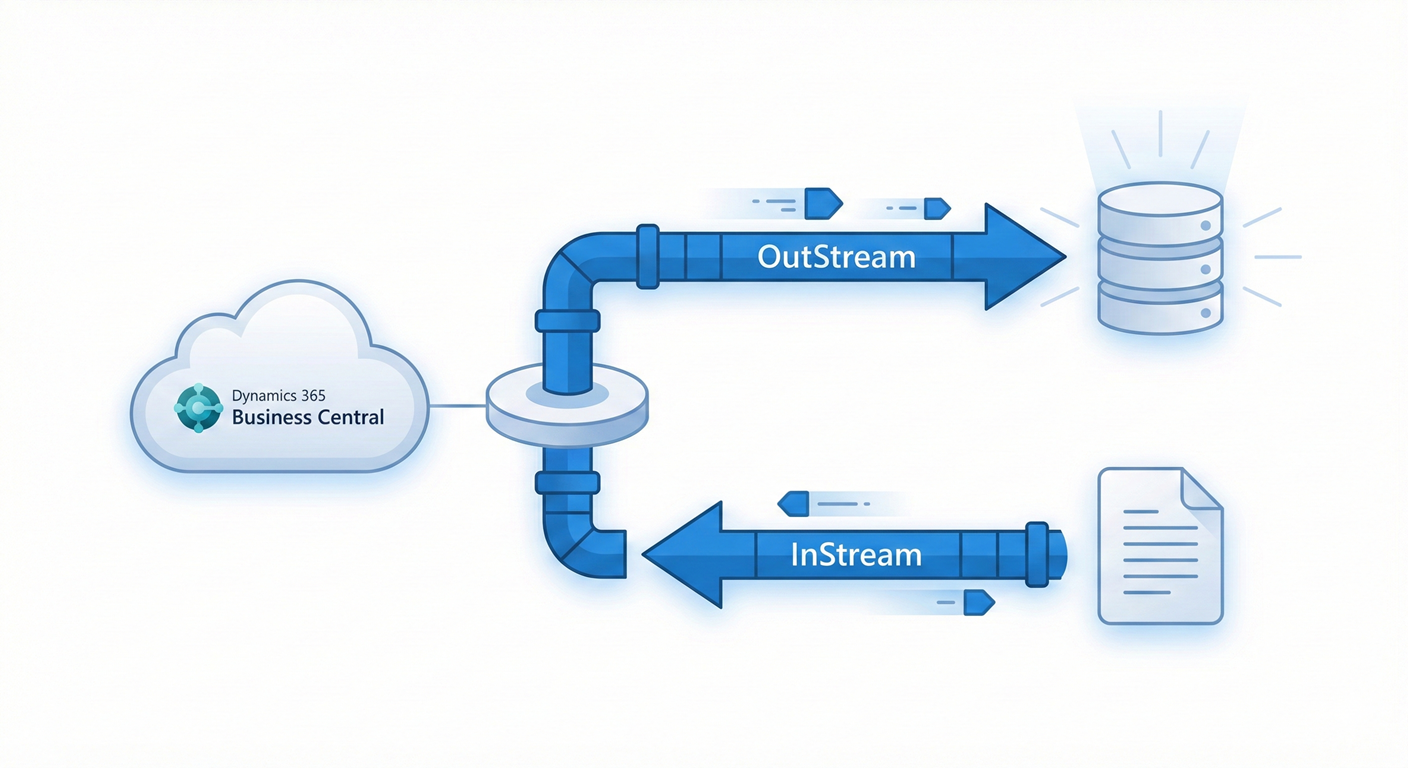
In AL, a stream represents a one-way, sequential flow of data.
- An
OutStreamwrites data to a destination - An
InStreamreads data from a source
The stream itself:
- Does not store data
- Does not own the data
- Is forward-only
- Cannot be rewound or repositioned
The actual data lives elsewhere. Common stream sources and destinations include:
- BLOB fields
- Media and MediaSet fields
- Temporary blobs
- File upload and download operations
- HTTP request and response bodies
A useful mental model is to think of a stream as a pipe: it moves data, but it does not contain it.
How streams are created (and why that matters)
You never instantiate InStream or OutStream directly. Instead, they are created by calling methods such as CreateInStream or CreateOutStream on another object.
That object defines:
- Where data is written to
- Where data is read from
- When the data becomes available
This is why stream behavior cannot be understood in isolation. The same InStream behaves differently depending on whether it is bound to a BLOB, Media, file, or HTTP payload.
Writing data with OutStream
When writing data, the correct sequence is always:
- Create the
OutStream - Write data to it
- Persist the owning record (if the stream is bound to a table field)
Example: writing to a BLOB field
var
    OutStr: OutStream;
begin
    Rec.Init;
    Rec."My Blob Field".CreateOutStream(OutStr);
    OutStr.WriteText('Hello, stream');
    Rec.Insert();
end;
Persistence is explicit, not automatic
When an OutStream is created on a record field (such as a BLOB or Media field):
- Writing to the stream does not immediately commit data to the database
- The data is finalized only when
Insert()orModify()is called - If the record is never written, the data is lost
This persistence rule is one of the most common sources of empty-BLOB bugs and must be understood clearly.
Reading data with InStream
Reading follows the opposite flow:
- Ensure data exists
- Load the field if required
- Create the
InStream - Read sequentially
Example: reading from a BLOB field
var
    InStr: InStream;
    Result: Text;
begin
    Rec.CalcFields("My Blob Field");
    Rec."My Blob Field".CreateInStream(InStr);
    InStr.ReadText(Result);
end;
InStream is a snapshot, not a live view
An InStream reflects the state of the underlying data at the moment the stream is created.
This means:
- If the data changes after the
InStreamis created, the stream does not see those changes - Creating an
InStreamtoo early can result in reading empty or outdated data - To read updated content, a new
InStreammust be created
This snapshot behavior is intentional and fundamental to how streams work.
The most common mistake: creating streams in the wrong order
❌ Incorrect pattern
Rec."My Blob Field".CreateInStream(InStr);
Rec."My Blob Field".CreateOutStream(OutStr);
OutStr.WriteText('Data');
InStr.ReadText(Result);
Why this fails
- The
InStreamis created before any data exists - Streams do not refresh automatically
- The
InStreamreads an empty snapshot
✅ Correct pattern
Rec."My Blob Field".CreateOutStream(OutStr);
OutStr.WriteText('Data');
Rec.Modify();

Rec.CalcFields("My Blob Field");
Rec."My Blob Field".CreateInStream(InStr);
InStr.ReadText(Result);
Streams are forward-only and sequential
Streams in AL are sequential by design.
You cannot:
- Seek
- Reset position
- Read the same data twice from the same stream
If you need to:
- Read data multiple times
- Transform data in stages
- Parse conditionally
You must:
- Recreate the stream
- Or store the data elsewhere (for example, in a temporary blob)
This design supports efficient handling of large payloads and aligns with standard stream semantics.
BLOB vs Media fields: similar streams, different storage
Both BLOB and Media fields expose streams, but they differ in storage and lifecycle.
BLOB fields
- Stored directly in the database
- Fully controlled by AL code
- Commonly require
CalcFieldsbefore reading - Often used for custom or structured data storage
Media and MediaSet fields
- Store references (GUIDs) to system-managed media storage
- Optimized for binary content such as images and documents
- Stream behavior is the same, but storage is handled by the platform
- Still commonly require
CalcFieldswhen reading from the database
TextEncoding: an important detail for correctness
When using ReadText and WriteText, character encoding matters.
If encoding is not explicitly specified:
- Default runtime behavior is used
- Cross-system scenarios may introduce unexpected character issues
Explicitly specifying TextEncoding (such as UTF-8) is recommended for:
- File handling
- Integrations
- API payloads
This ensures predictable behavior and avoids subtle data corruption.
Using Temp Blob as an intermediary
The Temp Blob codeunit is designed for scenarios where you need:
- Temporary storage
- Multiple reads
- Data transformation
- Isolation from database persistence
Typical pattern:
TempBlob.CreateOutStream(OutStr);
OutStr.WriteText(JsonText);

TempBlob.CreateInStream(InStr);
InStr.ReadText(Result);
This avoids unnecessary database writes and makes stream usage explicit and safe.
Performance considerations
Streams:
- Scale better than large
Textvariables - Avoid loading entire payloads into memory
- Are suitable for large binary and textual data
However:
- Streams are not automatically “faster”
- Performance depends on the underlying storage
- Database writes still incur transaction cost
Streams provide correctness and scalability, not magic performance gains.
When to use streams (and when not to)
Use streams when:
- Handling files
- Working with BLOB or Media fields
- Processing large payloads
- Building integrations and APIs
Avoid streams when:
- Data is small and simple
- A short
Textvariable is sufficient - No persistence or transformation is required
Streams are powerful, but they are not a universal solution.
Final thoughts
InStream and OutStream are not just technical helpers—they are fundamental abstractions in how Business Central moves data safely and efficiently.
Understanding that:
- Streams are interfaces, not storage
- OutStream data is persisted only on record writes
- InStreams are snapshots at creation time
- Streams are forward-only
- Encoding matters
…eliminates a large class of subtle, hard-to-diagnose bugs.
Once these principles are clear, stream-related code stops feeling unpredictable and starts behaving exactly as expected.