A webhook subscription in Business Central lives for three days. If the job that renews it fails on a Friday, the subscription can lapse over the weekend, and neither system reports an error. The receiver sees a quiet weekend while the target system drifts.
That is the trouble with treating webhooks as a sync mechanism. A notification tells you that something changed and where to look. It doesn’t carry the record, and Business Central doesn’t promise to tell you about every change. Expiry is only one of several ways the stream goes silent.
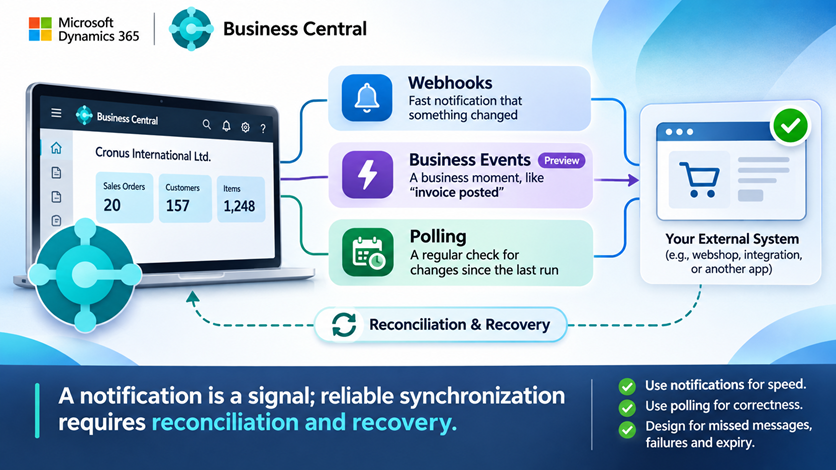
I’d use notifications for speed and a scheduled poll for correctness, and I wouldn’t run the first without the second when the data matters. Business events sit between the two: they have better transaction semantics than webhooks, but they are still in preview.
Three Ways to Detect Change
Business Central gives an external system three options. They differ in what triggers them, what arrives, and who notices when something is missed.
| Mechanism | Triggered by | What the receiver gets | Status |
|---|---|---|---|
| API webhooks | A record behind a subscribed API changes | A pointer: resource path and change type | Generally available |
| External business events | AL code raises a named business event | A small payload defined by the event | Preview |
| Polling | The external system asks on a schedule | The changed records themselves | Generally available |
API Webhooks
You create a subscription with a POST to the subscriptions endpoint, naming the API resource to watch, the URL that receives notifications and an optional clientState value:
POST https://{businesscentralPrefix}/api/v2.0/subscriptions
Content-type: application/json

{
  "notificationUrl": "https://{notificationUrl}",
  "resource": "/api/v2.0/companies({companyId})/customers",
  "clientState": "optionalValueOf2048"
}
Business Central then calls your notification URL with a validationToken query parameter. The subscription is registered only if the receiver returns that token in the response body with 200 OK. Every notification carries the clientState back, which makes it a shared secret. It isn’t a signature, though, so the receiver still has to check what it receives.
The notifications themselves are thin. This one is adapted from the sample in Microsoft’s webhook documentation:
{
  "value": [
    {
      "subscriptionId": "webhookCustomersId",
      "clientState": "someClientState",
      "expirationDateTime": "2026-11-27T12:50:30Z",
      "resource": "api/v2.0/companies({companyId})/customers({customerId})",
      "changeType": "updated",
      "lastModifiedDateTime": "2026-11-24T12:54:26.057Z"
    },
    {
      "subscriptionId": "webhookCustomersId",
      "clientState": "someClientState",
      "expirationDateTime": "2026-11-27T12:50:30Z",
      "resource": "api/v2.0/companies({companyId})/customers({otherCustomerId})",
      "changeType": "deleted",
      "lastModifiedDateTime": "2026-11-24T12:54:30.503Z"
    }
  ]
}
There are no field values: just the subscription ID, the clientState, the expiry time, a relative resource path, a changeType (created, updated, deleted or collection) and a lastModifiedDateTime. The receiver has to call the API to read the record, and by then it may have changed again.
Webhooks work on the standard v2.0 APIs, such as customers, items, vendors, sales orders and sales invoices, and on custom API pages. On document APIs, a change to a line raises a notification for the header. The resource path includes the company, so each subscription covers one resource in one company.
External Business Events (Preview)
Business events describe business moments rather than row changes: an invoice posted, a customer blocked, a purchase order released. A developer declares them in AL with the ExternalBusinessEvent attribute, and the procedure’s parameters become the payload. External systems read the catalog through the externalbusinesseventdefinitions endpoint and subscribe with their own notification URL through externaleventsubscriptions. Since version 22.2, Business Central has shipped a built-in catalog of sample events.
Polling with lastModifiedDateTime
With polling, the external system asks for records changed since its last successful run. It filters on lastModifiedDateTime, which the standard APIs map from the SystemModifiedAt system field:
GET .../companies({companyId})/customers
    ?$filter=lastModifiedDateTime gt 2026-11-01T00:00:00Z
    &$orderby=lastModifiedDateTime asc
Prefer: odata.maxpagesize=1000
Illustrative, not a complete poller: a real run follows every @odata.nextLink, stops without moving the checkpoint if any page fails, and re-reads a small overlap, as described in Polling Done Properly below.
Polling is the oldest and least elegant of the three, and the only one that lets the receiver reconcile current state on its own schedule. Microsoft deprecated OData delta links in versions 23 and 24 and points to webhooks instead, which leaves a timestamp filter as the supported way to query for changes.
How Webhooks Fail Quietly
Each of these comes from Microsoft’s documentation, and none raises an error on either side.
Subscriptions Expire After Three Days
A subscription expires after three days unless it is renewed. Renewal is a PATCH to the subscription with an If-Match header carrying its current eTag, and it repeats the handshake: Business Central calls the notification URL again and renews only if the receiver returns the validationToken with 200 OK.
So renewal needs two things working at the same moment, the job that sends the PATCH and the endpoint that answers the handshake. If either is down long enough, the subscription lapses and Business Central stops sending. Watch the expirationDateTime on each subscription; it’s the earliest warning you get.
Bulk Changes Become One Collection Notification
Business Central waits 30 seconds after the first change before it notifies, so several quick edits to one record produce a single notification. If more than 1,000 records change in that window, it sends one notification with changeType set to collection and a filter in the resource path. The receiver has to run that filter to find out what changed.
A receiver written only for created, updated and deleted drops that notification, and every change inside it. The Business Central connector for Power Automate has exactly this gap: it can’t process collection notifications, so in Business Central online a flow isn’t triggered when more than 1,000 records change within 30 seconds.
The Wrong Response Code Deletes the Subscription
When a delivery fails, Business Central retries over the next 36 hours, but only if the receiver answered 408, 429 or a 5xx. Any other error code ends the retries and deletes the subscription.
Ordinary receiver bugs become data loss this way: a 400 from a validation error, a 401 after a key rotation, a 404 after a route change. Accept and store notifications quickly, and when you genuinely can’t, answer with a code Business Central will retry. If the receiver is down for longer than 36 hours, the missed notifications aren’t coming.
Notifications That Wait for Another User
Changes made by users who can’t schedule job queues aren’t notified until a user who can makes another change to the same table. Changes by a delegated admin are held too, until a licensed user next changes the entity.
On a quiet table, a change can wait for as long as nobody else edits it. Check the job queue permissions of every account that writes to an integrated table before go-live.
Custom APIs You Can’t Subscribe To
Custom API pages support webhooks, with exceptions: a temporary or system source table, a composite key, Job Queue Entry as the source table, or an API query instead of an API page. The composite key is the one that catches custom designs. Expose a single key, typically SystemId through ODataKeyFields, and confirm the result in the webhookSupportedResources endpoint, which lists the resources Business Central can send notifications for.
There’s also a ceiling. Business Central online allows 200 webhook subscriptions per environment, according to its operational limits. Each subscription covers one resource in one company, so a multi-company tenant with several integrated entities reaches that number sooner than you’d expect.
Business Events: Better Semantics, Still in Preview
Business events fix the most awkward property of row-level notifications: they describe something that actually happened. According to the business events overview, a notification is sent only after the transaction commits. If the transaction runs long, the notification waits; if it rolls back, for example on an AL error, nothing is sent.
An HTTP call made from AL inside a posting transaction can announce a document that is then rolled back. A business event can’t. It’s the same reason to keep external calls out of posting that I covered for e-invoicing in UAE e-Invoicing in Business Central.
You declare an event as an empty procedure with the ExternalBusinessEvent attribute. Its parameters become the payload, and an optional RequiredPermissions attribute restricts who can subscribe:
[ExternalBusinessEvent('salesorderposted', 'Sales order posted', 'Triggered when a sales order has been posted', EventCategory::Sales)]
[RequiredPermissions(PermissionObjectType::TableData, Database::"Sales Header", 'R')]
procedure SalesOrderPosted(SalesOrderId: Guid; OrderNo: Code[20]; CustomerName: Text)
begin
end;
Illustrative, based on Microsoft’s documented sample; it assumes an EventCategory enum extension with a Sales value. Not compiled.
Where you raise the event matters. Microsoft’s sample raises it from the Sales Order page, which fires only when a user posts from that page. For an integration contract, raise it from the posting logic, so documents posted by a batch job or through an API produce the same notification.
Payloads are limited to simple types such as Guid, Text, Code, Decimal, Integer, Date, DateTime, Enum and Boolean. Subscribers need the Ext. Events – Subscr permission set, read access to the ExternalBusinessEventDefinition table in each subscribed company, and whatever the event’s RequiredPermissions demand.
Preview means the content and behavior can change. Subscriptions created through the Power Automate trigger can’t target specific companies yet, and delivery and versioning are still open questions (see below). Until they’re answered, I’d treat business events as a better trigger rather than a delivery mechanism, and keep a way to reconcile.
Polling Done Properly
Polling has a reputation for waste, and a badly written poller earns it. A well-written one is the backbone of a reliable integration, because it reconciles current state without depending on any notification. Know its limits, though. A poll returns each record’s current state, not the changes in between. It can’t see deletions, and it returns only what the integration user is allowed to read.
Calculated values are a blind spot too. lastModifiedDateTime comes from the record’s SystemModifiedAt, which changes only when that record is inserted or modified. A value calculated from other tables, such as an item’s inventory, can change when ledger entries are posted without the item record being modified, so a timestamp poll won’t see it. Webhooks don’t help here: they react to changes in the API’s source table, and line-to-header notifications are documented only for document APIs. If the target needs calculated values, read them on their own schedule.
Tracking the Last Change You Processed
Keep a durable checkpoint for each company and resource: the highest lastModifiedDateTime you have successfully applied, not the time the job last ran. Query from it in ascending order and let the server page the results. Send Prefer: odata.maxpagesize and follow each @odata.nextLink until a response has none; Business Central online returns at most 20,000 entities per page. Don’t page with $top, which only caps the result and can end a run early without any error. Move the checkpoint only after every page has been applied.
Don’t trust the checkpoint boundary either. Records can share a timestamp, and a record changed inside a long transaction can become visible after your checkpoint has already passed its timestamp, so a strict gt filter can skip it. Re-read a small overlap and skip records you’ve already applied, keyed by SystemId.
Polling also spends API requests, and Business Central returns 429 Too Many Requests when you exceed its rate limits, so poll as often as the business needs rather than as often as you can. Microsoft recommends read scale-out for API pages and queries used for extraction; Business Central online enables it on its databases. With many companies and tables, a codeunit exposed as a web service can report which tables have new data, so you call only those APIs.
Deletions Need Their Own Strategy
A timestamp filter returns added and modified records, so it can’t return one that no longer exists. Microsoft describes three ways to close the gap:
- Look up known records by
SystemId. A record the API reports as not found was deleted, though you won’t learn when. Trust only a genuine not-found answer for a user whose permissions and security filters cover that record; an authentication, permission, throttling or server error proves nothing. - Track deletes yourself. Subscribe to
OnAfterGetDatabaseTableTriggerSetupandOnAfterOnDatabaseDeletein codeunit 49GlobalTriggerManagement, and write deletions to your own table. This adds work to every delete on the tables you enable, and with some delete-related subscribers, bulk methods such asDeleteAllfall back to row-by-row SQL calls. Enable it only for the tables you integrate, and measure the impact. - Use the change log. Enable it for the relevant tables and read deletions from it. It has a performance cost, so limit it to the tables that need it.
Webhooks do report deletions, with changeType set to deleted. It’s one of their real advantages over polling, as long as the notification arrives.
The Combined Design: Notify, Then Reconcile
The three mechanisms aren’t competitors. Notifications are fast but can’t prove completeness; polling can reconcile but is slow. A reliable integration uses push for speed and pull for recovery, and treats every notification as a hint to go and read the current state.

The design has five parts.
1. The Receiver
The receiver’s only job is to accept notifications safely. It:
- answers the validation handshake;
- checks
clientStateand the subscription ID against its own records; - treats the
resourcepath as untrusted input, and checks its company ID, API route and entity against what that subscription was created for; - writes valid entries to a durable queue, and failed ones to a durable quarantine that raises an alert;
- returns
200 OKonly after every entry is persisted.
When it can’t persist, or its own rate limit is reached, it answers 429 or a 5xx so Business Central retries. It never answers a failed check with a 4xx, because a 4xx to a genuine Business Central call deletes the subscription.
2. The Worker
The worker reads the queue and acts on changeType:
createdorupdated: read the record from the API and upsert it.deleted: apply an idempotent delete or tombstone keyed on the ID in the validated path. Don’t try to read a record that’s gone.collection: run the supplied filter against the validated entity, follow every page, and reconcile the results.
It builds every request from the Business Central base URL in its own configuration plus the validated path, never from a full URL taken out of a notification. And it keeps a missing record apart from an authentication, permission or throttling error.
3. The Renewal Job
The renewal job renews every subscription well before its expirationDateTime, confirms that each expected subscription still exists, and recreates any that are missing. Because renewal repeats the handshake, the job and the receiver must both be healthy at the same moment. Alert when a subscription’s expiry is closer than your renewal interval, and when an expected subscription disappears from the subscription list. Treat a failed renewal as an incident.
4. The Catch-Up Poll
The catch-up poll follows the polling rules above: checkpoint, ascending order, server-driven paging, overlap and read scale-out. It applies whatever the notifications missed, such as lapsed subscriptions, unprocessed collections and delayed notifications. In effect, it audits the webhook path.
Its interval decides how quickly a missed change is repaired, and even that isn’t guaranteed: a nightly poll that is throttled, fails partway or hits a target-system outage can leave data wrong for more than a day. Agree a recovery objective with the business owner that accounts for run duration, retries and outages, and alert when a run misses it.
5. The Deletion Strategy
Deleted notifications cover the normal case. One of the three deletion-tracking options above covers the rest.
Handling Duplicates
This design sees the same change more than once, by construction. Business Central retries deliveries, and the catch-up poll re-reads changes the webhook path may already have applied. Make every apply step idempotent: key target records on the Business Central SystemId, and skip an update when the incoming lastModifiedDateTime isn’t newer than the one you already applied. The request-side patterns behind this are in Business Central API Integrations in Production.
What the Documentation Doesn’t Settle
A few questions have no clear answer on Microsoft Learn yet. Design around them instead of guessing:
- Business event delivery. Retry, expiry and failure behavior for business event subscriptions isn’t described. Don’t assume it matches webhooks.
- Business event versioning. The preview overview lists translation and versioning as unsupported, but the
ExternalBusinessEventattribute reference now shows an optionalVersionargument. Neither page explains what it does for subscribers, so check your target version before relying on versioned event contracts. - The resource format. Microsoft’s samples show
resourceas a relative path. Validate it as one, and never let it decide which host you call.
Decision Matrix
| API webhooks | Business events | Polling | Webhooks + catch-up poll | |
|---|---|---|---|---|
| Typical delay | 30 seconds or more after the first change | After the transaction commits; further timing undocumented | The poll interval plus run time | Seconds normally; the recovery interval after a miss |
| What arrives | A pointer: resource path and change type | The payload you define | The current state of changed records | A pointer, then the current record |
| Deletions | Yes, as deleted | Only if you define a deletion event | No; needs separate tracking | Yes, with tracking for gaps |
| More than 1,000 changes in 30 seconds | One collection notification to query | A notification per raised event; delivery guarantees undocumented | Handled by server-driven paging | Collection query, then the poll |
| Quiet failure modes | Expiry, deletion on the wrong response code, delayed notifications | Delivery behavior undocumented; preview | Paging or checkpoint bugs; no intermediate states | Most gaps are caught by the poll |
| Operational effort | Receiver and renewal job | Receiver and subscription setup | Scheduler and checkpoint | All of the above |
| Best fit | Fast sync where short gaps are tolerable | Reacting to business moments such as posting or release | Batch loads and slow-changing data | Any integration where the target must end up correct |
If a missed change costs money, such as orders, stock or customer credit status, use webhooks with a catch-up poll and accept the extra moving parts. Use business events when the trigger is a business moment rather than a row change and preview status is acceptable, and keep a way to reconcile anyway. Use polling alone when minutes or hours of delay are fine; it’s the simplest of the three to run and the easiest to reason about. And don’t use webhooks alone for anything you’d have to explain to an auditor.
Common Mistakes
- Treating the notification as the data. It’s a pointer. Read the record, and expect it to have changed again.
- Ignoring
collection. A receiver that handles only created, updated and deleted loses every change in a bulk operation. Power Automate flows have the same blind spot. - Answering
4xxto problems you could recover from. Only408,429and5xxtrigger retries; anything else deletes the subscription. - Following the resource value. Check its company, route and entity, and build the request from your own base URL.
- Paging with
$top. Follow@odata.nextLink, and move the checkpoint only after the last page. - Expecting a timestamp poll to see everything. It misses deletions, intermediate states and calculated values.
- Raising business events from page events. Raise them from the business logic they describe.
Where I Land
No single mechanism guarantees that an external system holds the right data. Webhooks are fast and fragile, business events are still in preview, and polling is slow but the only one that can reconcile on its own. The design that holds up combines them.
Before building it, get one number agreed with the business owner: how long the target system may stay wrong before it is repaired, including the time a recovery run takes. The poll interval, the alerting and the renewal margin all follow from that number.