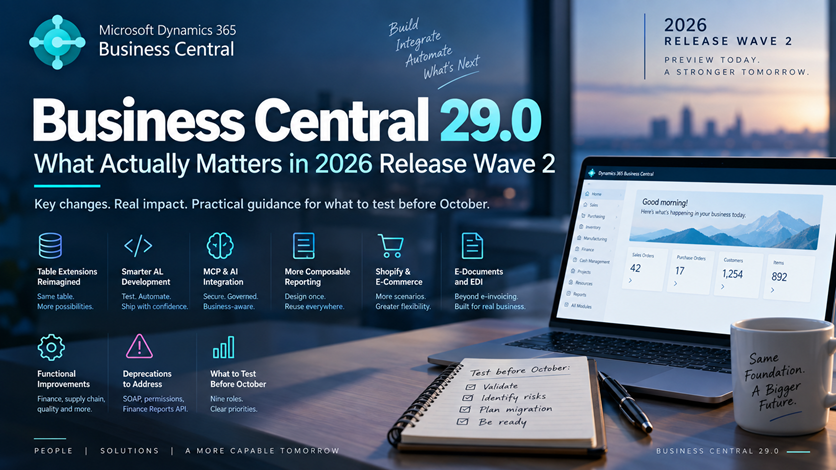
A new Business Central major version usually starts the same way: you open the release notes, see dozens of features, and try to determine which ones actually matter for your projects.
Business Central 29.0 is different.
The September 2026 public preview doesn’t just introduce another collection of functional improvements. It touches areas much closer to solution architecture: how table-extension fields are stored, what indexes extensions can define, how AL projects can be tested and analyzed, how AI agents access Business Central data, how reports are composed, and which legacy integration patterns are finally being removed.
For developers and partners, the useful question isn’t:
What’s new in Business Central 29?
It’s:
What should I validate before my customers move to Business Central 29?
At the time of writing, version 29.0 is still a public preview. Microsoft states that the preview applies only to Business Central online sandbox environments, isn’t intended for production use, and remains subject to change. General availability is planned for the first week of October 2026.
That distinction matters throughout this article.
- What Matters Most in Business Central 29.0
- Who Should Test What First
- Business Central 29.0 Is Still Preview — Start There
- The Real Question Isn't “What's New?” — It's “What Changes Your Architecture?”
- 1. Table Extension Storage and Indexing Change the Database Conversation
- 2. AL Development Is Becoming More Automation-Friendly
- 3. Smaller AL Changes Have Larger Design Implications
- 4. MCP Is Moving Beyond Existing APIs
- 5. Reporting Is Becoming More Composable
- 6. Functional Changes Worth Testing
- 7. Upgrade and Deprecation Risks That Can Affect Existing Solutions
- 8. Index Management Is Expanding, but the Preview Documentation Conflicts
- 9. What to Test Before October
- Conclusion: What Not to Assume From the Business Central 29.0 Preview
What Matters Most in Business Central 29.0
If you read nothing else, focus on four things.
The table-extension storage model is changing, which makes database behavior and indexing worth retesting.
Microsoft UI pages exposed through SOAP are removed in version 29.0, and on-premises environments still relying on data-defined-only permission sets need attention before upgrading.
The Finance Reports API also enters deprecation in this release, so integrations using it should start moving toward the Analytics API rather than waiting for version 30.
Who Should Test What First
Before going deeper into the architecture, this is the practical triage view I would use for a 29.0 preview assessment.
| Owner | First thing to validate |
|---|---|
| AL developer | Extension compilation, analyzers, schema synchronization, automated tests |
| Technical lead | Performance of heavily extended and high-volume tables |
| Integration owner | SOAP exposure, APIs, Finance Reports API dependencies, authentication |
| Admin | Permissions, deployment, telemetry, environment management |
| Functional consultant | Posting-critical flows, warehouse/manufacturing, reporting |
| AI/agent owner | MCP permissions and read/write boundaries |
| Reporting owner | Custom layouts, Word layouts, financial reports, automation |
| Ecommerce owner | Shopify order, return, refund, B2B, pricing, and tax workflows |
| E-document owner | Supported Peppol/EDI scenarios and connector compatibility |
The rest of the article explains why these areas deserve attention.
Business Central 29.0 Is Still Preview — Start There
Before discussing individual features, don’t make the common mistake of treating the September preview as the final October product.
Microsoft explicitly classifies the 29.0 documentation as prerelease. More on-premises information is also expected when version 29 becomes generally available.
The preview is therefore best used for three things:
- Validating extension compatibility
- Testing integrations and critical processes
- Identifying changes that require design or migration work
It isn’t a safe basis for assuming that every documented detail will remain identical at GA.
Preview environments are temporary as well. Microsoft automatically deletes them 30 days after version 29.0 becomes generally available, and preview environments can’t subsequently be upgraded to another version.
Don’t build anything in a 29.0 preview sandbox that you expect to preserve.
There is another change in how we should think about releases.
Starting in September 2026, Microsoft is moving away from traditional twice-yearly Release Plans and publishing upcoming Dynamics 365, Power Platform, and Dataverse capabilities through the AI at Work roadmap.
Business Central also continues to receive monthly updates that can contain new functionality, regulatory updates, and fixes.
In other words:
Don’t assume “Business Central 29.0 GA” means every capability associated with the late-2026 roadmap becomes available on the first day of October.
Check important feature availability individually.
If you want a more traditional feature-oriented overview, my earlier article on Business Central 28 / 2026 Release Wave 1 follows that format.
For version 29, I think the architectural implications deserve more attention than another feature catalog.
The Real Question Isn’t “What’s New?” — It’s “What Changes Your Architecture?”
There are many interesting features in 29.0.
But not all features deserve the same amount of architectural attention.
For most projects, I would separate them into four groups:
| Area | Why it matters |
|---|---|
| Table extension storage and indexing | Can affect data access, extension design, and performance decisions |
| AL tooling and runtime capabilities | Changes development, testing, CI/CD, debugging, and concurrency options |
| MCP and agent integration | Expands how AI systems can reach Business Central data and logic |
| Upgrade and deprecation changes | Can directly affect existing integrations or on-premises configurations |
Functional improvements such as Expense Agent, reporting, Shopify, E-Documents, quality management, and subcontracting matter according to the customer’s processes.
The architectural changes deserve attention even before a customer asks for one of the new features.
1. Table Extension Storage and Indexing Change the Database Conversation
This is probably the most fundamental platform change in the 29.0 preview.
Microsoft describes a new table-extension data model where all fields belonging to an AL table are stored in the same database table.
Microsoft also states that this provides faster performance for database operations involving table extensions.
That sounds like an implementation detail.
It isn’t.
Business Central solutions often contain multiple extensions adding fields to heavily used tables such as:
- Customer
- Vendor
- Item
- Sales Header
- Sales Line
- Purchase Header
- Purchase Line
- Item Ledger Entry
- G/L Entry
Those fields aren’t just displayed on pages. They’re used in posting, filtering, reports, APIs, integrations, and background processing.
How Business Central physically stores extension data therefore matters.
Benchmark the New Storage Model Instead of Assuming Performance Gains
Microsoft says the new model makes database operations involving table extensions faster.
That does not mean you should publish statements such as:
Business Central 29 makes extensions 30% faster.
There is no universal percentage.
Real impact depends on:
- Table size
- Selected fields
- Filters
- Indexes
- Workload
- Data volume
- Concurrency
- Extension design
My recommendation is simple:
Benchmark the workload that matters to the customer.
For example:
- Posting a 500-line sales order
- Filtering a large customized list
- API reads against heavily extended tables
- Reports reading multiple extension fields
- Batch jobs scanning ledger tables
The platform change creates an opportunity.
It doesn’t eliminate performance engineering.
Use Cross-Base and Extension Indexes Carefully
The same preview introduces the ability for developers to define indexes spanning fields from a base table and its table extensions.
This addresses a real extension-design limitation.
Imagine an extension adds:
External Processing Status
to a high-volume standard table.
Your application frequently filters using a combination such as:
- Standard Posting Date
- Standard Customer No.
- Custom External Processing Status
Being able to design an index around the actual access pattern could be valuable.
But there is a trap.
The fact that Business Central allows another index doesn’t mean you should create one.
Indexes improve reads, but they also have costs:
- Inserts must maintain them
- Updates may maintain them
- Database storage increases
- Synchronization becomes more complex
- An index designed for one workload might provide little benefit elsewhere
This is the same principle I discuss in Locking and Deadlocks in Business Central: optimizing one database behavior without understanding the wider transaction can simply move the bottleneck somewhere else.
Create indexes because profiling or telemetry identifies an access pattern worth optimizing—not because version 29 gives you another knob to turn.
Watch for Tables Approaching SQL Column Limits
The preview adds compiler warnings for tables and table extensions containing large numbers of normal fields as they approach SQL extensibility limits.
That feature becomes especially relevant with the new storage model.
The lesson isn’t that adding fields to table extensions is suddenly dangerous.
It’s that extension architecture still has physical database limits.
If several apps all extend the same core tables, teams should understand their combined footprint, not review every extension as though it runs in isolation.
That matters particularly in:
- Large per-tenant implementations
- AppSource-heavy environments
- Multi-ISV solutions
- Heavily customized Sales Line or Item tables
Treat Cross-Extension Index Syntax as Preview-Dependent
At the time of writing, Microsoft’s 29.0 preview page explicitly announces indexes spanning base-table and table-extension fields.
However, the general Table Keys documentation still describes the older restriction that prevents one table-extension key from combining base and extension fields.
The detailed page predates the version 29 announcement.
That is exactly the type of preview documentation mismatch that should be treated carefully.
So I would currently accept the capability as documented for the 29.0 preview, but I would not publish production AL syntax for it until Microsoft updates the detailed developer documentation or version 29 reaches GA.
2. AL Development Is Becoming More Automation-Friendly
Version 29 contains an unusually large number of development improvements.
Microsoft lists capabilities including:
- Parameterized and data-driven AL tests
- Dynamic AL MCP workspaces
- AI-assisted failure debugging
- AI-assisted profiling
- Structured compiler diagnostics
- Command-line AL test execution
- Standalone AL language intelligence
- Automatic .NET runtime acquisition
- Connected-environment object discovery
- Agent-assisted AL object ID allocation
Looking at those features individually misses the larger direction.
The AL development environment is becoming easier to operate outside a developer manually clicking through Visual Studio Code.
That matters for:
- CI/CD
- Automated quality gates
- Coding agents
- Headless builds
- Repeatable test execution
- Automated diagnostics
Move ALTool Toward the Delivery Pipeline
Microsoft states that ALTool can compile, deploy, and run AL test projects from scripts or CI/CD pipelines and return structured JSON results containing pass, fail, and skipped test information.
For teams using Azure DevOps or GitHub Actions, that matters more than another editor convenience.
A mature AL delivery pipeline should increasingly move toward:
Compile → Analyze → Deploy → Test → Capture diagnostics → Promote
rather than:
Developer compiles locally → looks fine → deploy
That doesn’t mean every extension suddenly needs hundreds of automated tests.
It means Microsoft is reducing the friction involved in making automated testing part of AL delivery.
3. Smaller AL Changes Have Larger Design Implications
Some version 29 features look minor in the release list but solve specific development problems.
Distinguish Record.IsDirty from the Existing RecordRef.IsDirty
RecordRef.IsDirty() is not new. It has been available since runtime version 5.0.
What’s new in the Business Central 29.0 preview is Microsoft extending this capability to the Record API, so developers can determine whether a regular record instance contains unsaved changes without first moving into a RecordRef-based pattern.
That distinction matters because experienced AL developers will already recognize RecordRef.IsDirty().
The usefulness is straightforward: validation frameworks, generic processing, and other logic can make decisions based on whether an in-memory record has actually changed rather than relying on custom dirty-state tracking.
I would still validate the final Record API syntax against the GA developer documentation before publishing production code that depends on it.
Use Isolation Controls Only When the Transaction Requires Them
Microsoft also lists additional transaction-isolation control for queries and IsolatedStorage, including committed-read behavior for queries and locking options for safer read-modify-write operations.
That is useful—but potentially dangerous if applied casually.
Locks solve correctness problems by reducing concurrency.
If you use stronger locking everywhere because it sounds safer, you can simply exchange one problem for another:
Lost updates → blocking → contention → deadlocks or poor throughput
If transaction isolation is relevant to your implementation, I cover the underlying design problem more deeply in Locking and Deadlocks in Business Central: Writing AL Code That Survives Production.
The rule doesn’t change in version 29:
Use stronger isolation because the transaction requires it, not because stronger locking sounds more robust.
Evolve Interfaces Without Breaking Every Implementor
Microsoft also documents default implementations for AL interfaces, together with RequiredPending and analyzer support for gradually introducing required methods.
This matters in multi-extension ecosystems.
Consider the classic problem:
- Extension A defines an interface.
- Extensions B, C, and D implement it.
- Extension A needs another interface method.
- Every implementor risks becoming a breaking dependency.
Default implementations make that evolution easier to stage.
For AppSource solutions and larger internal extension ecosystems, that is a maintainability feature—not just a language convenience.
And when extension contracts evolve, the same upgrade discipline still applies. My article Upgrading Business Central Extensions Without Data Loss covers the broader production concerns around evolving deployed extensions safely.
4. MCP Is Moving Beyond Existing APIs
Business Central’s MCP story continues to mature.
The Business Central MCP server exposes Business Central capabilities to AI clients. Microsoft’s current configuration documentation states that agents receive read-only access to exposed API pages by default.
Create, modify, delete, and bound-action operations must be explicitly configured.
That distinction matters.
Connecting an AI agent to Business Central shouldn’t mean:
Give the agent access to everything and trust the prompt.
A safer architecture is:
Agent → MCP configuration → explicitly permitted Business Central capabilities
Version 29 adds another important piece: custom MCP data-query tooling for situations where the required information isn’t already available through an existing API.
Microsoft describes the capability as allowing MCP applications to define, validate, and execute custom data queries.
That could reduce pressure to build a custom API for every analytical question an agent needs to answer.
But this is exactly where restraint matters.
Before designing around the feature, validate:
- Accessible data
- Permissions
- Filtering boundaries
- Performance
- Supported query complexity
- Auditability
- Final GA behavior
The preview currently establishes the direction.
It doesn’t justify inventing the missing details.
For conventional integration architecture, retries, idempotency, and failure recovery remain just as important as the endpoint technology itself. I cover that separately in Business Central API Integrations in Production.
5. Reporting Is Becoming More Composable
Reporting changes in version 29 can look like a collection of design enhancements.
Together, they point toward a more reusable reporting model.
Microsoft lists capabilities including:
- Reusable header and footer layouts
- Report themes
- Report-layout lifecycle control
- An updated Word add-in
- Conditional visibility
- Financial report packs
- Automated report output through Report Inbox APIs
- Automatic change logging for financial report definitions
This addresses a common Business Central problem.
A customer might have 20 document reports that all contain:
- Company branding
- Headers
- Footers
- Legal wording
- Standard formatting
Historically, those common elements easily become duplicated across layouts.
Duplicated layout logic creates the same maintenance problem as duplicated AL code.
If company branding changes, every copied layout becomes another asset that needs to be updated.
Composable layouts and report themes move Business Central toward treating shared document design as a reusable asset rather than something copied into every report.
That is more architecturally interesting than “new report themes” sounds.
6. Functional Changes Worth Testing
I wouldn’t turn this article into Microsoft’s feature table.
But several functional areas deserve attention.
Test Expense Agent as an End-to-End Process
The version 29 preview includes enhancements around:
- Approvals
- Interim approvers
- Duplicate prevention
- Travel requisitions
- Mileage
- Withholding-tax scenarios
- AI-assisted policy validation
The important shift is that Expense Agent is moving beyond simply capturing an expense.
It is increasingly covering the process around the expense.
For customers evaluating Expense Agent, that makes previous fit-gap decisions worth revisiting.
But validate the complete business process before assuming it replaces an existing expense-management solution.
Validate Finance Changes Against Real Local Requirements
The preview includes capabilities such as:
- Vendor withholding tax
- Employee withholding tax
- Multiple excise duties
- Accelerated depreciation
- Vendor-specific number series for self-billing
These features could reduce localization or customization requirements for some implementations.
But tax features require caution.
Don’t remove a working localization because a release-note title sounds equivalent.
Validate:
- Calculation
- Posting
- Reporting
- Local statutory requirements
Test Supply Chain, Quality, and Subcontracting End to End
Version 29 also includes improvements around:
- Direct transfers involving warehouse-enabled locations
- Quality tests and inspections
- Subcontracting setup
- Warehouse processing around subcontracting
- Manufacturing workflows
If the customer combines manufacturing and warehousing, test these end to end.
Warehouse configuration differences can completely change the behavior of what appears to be the same process.
Regression-Test Shopify Workflows
The Shopify connector shouldn’t be omitted from a complete version 29 discussion.
The preview includes improvements around:
- Sales-document creation from Shopify orders and returns
- Shopify API currency and connection maintenance
- B2B companies and catalogs
- Price synchronization
- Tax-line matching
- Edited orders, exchanges, and refunds
- Tariff numbers and countries or regions of origin
These aren’t equally relevant to every implementation.
But for customers using Shopify or Shopify Plus—especially B2B scenarios—the version 29 preview deserves regression testing against the exact connector workflows they use today.
Don’t assume that connector improvements automatically mean existing customizations around Shopify can be removed.
Validate E-Documents Beyond Electronic Invoicing
Another strategically interesting item is the preview capability to exchange EDI documents through the E-Documents framework using Peppol BIS 3, extending the framework into document types such as orders and payments.
That matters because E-Documents is increasingly becoming a broader exchange framework rather than being thought of only as electronic invoicing.
For customers working with Peppol or regulated e-document scenarios, this is worth watching closely.
At preview stage, however, validate the exact supported document scenarios and regional requirements before designing a production integration around it.
7. Upgrade and Deprecation Risks That Can Affect Existing Solutions
This is the section I would review before spending too much time on shiny new features.
Replace Microsoft UI Pages Exposed Through SOAP
This is a confirmed version 29 removal.
Starting with version 29.0, Microsoft UI pages can no longer be exposed as SOAP endpoints.
Notice the scope carefully.
This doesn’t mean:
SOAP completely disappears in BC 29.
The confirmed version 29 removal concerns Microsoft UI pages exposed as SOAP services.
Microsoft recommends moving integrations away from legacy SOAP patterns toward supported integration surfaces such as APIs and OData V4.
Review:
- Web Services configuration
- Middleware
- External integrations
- Legacy NAV/BC integrations
- Integration documentation
Identify anything consuming a Microsoft page through SOAP.
Then determine whether it should move to:
- A standard API
- A custom API page or query
- OData V4 where appropriate
- Another supported integration surface
Do this before the production upgrade.
Migrate Data-Defined-Only Permission Sets on Premises
This is another confirmed version 29 removal.
Through version 28.x, on-premises deployments can configure:
UsePermissionSetsFromExtensions = false
and continue relying only on the legacy data-defined permission model.
Microsoft’s dedicated platform-deprecation documentation states that starting with version 29.0, this capability is no longer available.
For modern SaaS implementations this might be irrelevant.
For an old on-premises environment containing years of customized permissions, it can become an upgrade project of its own.
Don’t discover it during cutover.
Start Migrating Away from the Finance Reports API
The Finance Reports API deserves attention too.
Microsoft has announced it as deprecated starting with Business Central 2026 release wave 2 and documents removal in Business Central 2027 release wave 1 / version 30.
The replacement direction is the Analytics API.
That doesn’t mean Finance Reports API integrations stop working the first day version 29 arrives.
That’s exactly why version 29 is the right time to identify them.
A deprecation window is migration time.
Check:
- Power BI solutions
- External reporting
- Custom data extraction
- Middleware
- Customer-built integrations
Don’t wait until version 30 to learn that an integration depends on something already scheduled for removal.
8. Index Management Is Expanding, but the Preview Documentation Conflicts
Index management deserves one more note.
Microsoft’s version 29 preview table contains two interesting items:
- AL developers can turn indexes on or off from AL code.
- Administrators can turn SIFT indexes on or off.
The first fits naturally with Microsoft’s broader move toward exposing index usage and database-management capabilities.
The second needs caution at the time of writing.
Microsoft’s current detailed Manage database index usage documentation still states that unique indexes, primary keys, SIFT indexes, and SystemId indexes are protected and can’t be turned off.
So there is currently a documentation mismatch between the version 29 preview table and the detailed index-management guidance.
Recheck SIFT Management at General Availability
My recommendation:
Don’t design production procedures around SIFT toggling yet. Recheck this capability when the version 29 GA documentation is published.
This isn’t evidence that the preview announcement is wrong.
It’s evidence that prerelease documentation can move faster than the detailed platform documentation—which is precisely why preview claims need version-specific validation.
9. What to Test Before October
The table above gives the quick triage view — the same nine areas, expanded here so each one has its own link in the table of contents.
AL Developers: Compile, Analyze, Synchronize, and Run Tests
Validate:
- Compilation against version 29
- Analyzers
- Schema synchronization
- Automated tests
- Dependencies
- Extension upgrade behavior
Technical Leads: Retest Heavily Extended and High-Volume Tables
Focus on:
- Posting performance
- Heavily extended standard tables
- Custom indexes
- Batch processing
- API reads
- Multi-extension interaction
Integration Owners: Audit SOAP, APIs, Finance Reports API, and Authentication
Review:
- Microsoft UI pages exposed through SOAP
- Standard and custom APIs
- Finance Reports API dependencies
- OData usage
- Middleware
- Authentication flows
Administrators: Validate Permissions, Deployment, Telemetry, and Environments
Check:
- Permission-set behavior
- Extension deployment
- Preview environment lifecycle
- Telemetry
- Update management
- Administrative database controls
Functional Consultants: Retest Posting-Critical, Warehouse, Manufacturing, and Reporting Flows
Prioritize:
- Posting scenarios
- Warehouse flows
- Manufacturing
- Subcontracting
- Quality management
- Financial reporting
AI and Agent Owners: Validate MCP Permission Boundaries
Test:
- Default read access
- Explicitly configured write operations
- Bound actions
- Data-query access
- Auditability
- Agent behavior against real permissions
Reporting Owners: Retest Layouts and Report Automation
Validate:
- Custom layouts
- Word layouts
- Report themes
- Reusable headers and footers
- Financial report packs
- Report Inbox automation
Ecommerce Owners: Regression-Test Shopify
Test:
- Orders
- Returns
- Refunds
- B2B catalogs
- Pricing
- Tax workflows
- Product synchronization
E-Document Owners: Validate Peppol and EDI Scenarios
Review:
- Supported document types
- Peppol workflows
- Connector compatibility
- Regional requirements
- Existing custom integrations
Test Multi-Extension Environments, Not Only Clean Sandboxes
I would deliberately test multi-extension customers.
A clean Cronus sandbox tells you very little about a production tenant containing:
- Ten partner extensions
- Five per-tenant extensions
- Years of data
- Several API integrations
- Job Queue processes
- Power Automate flows
- Custom reporting
Compatibility problems tend to appear between components, not while each component is tested alone.
That is where the preview provides the most value.
Conclusion: What Not to Assume From the Business Central 29.0 Preview
Business Central 29.0 isn’t interesting because it has another long list of features.
It is interesting because several changes affect the boundaries underneath our solutions.
The new table-extension storage model changes an important part of the database architecture.
Cross-base and extension indexes create new optimization opportunities—but also new ways to over-index a poorly understood workload.
Compiler warnings around SQL column limits remind us that extensibility still has physical database boundaries.
AL development is becoming more automation-friendly through ALTool, structured diagnostics, automated testing, language services, and agent-oriented tooling.
MCP is becoming a more capable integration layer for agents.
Reporting is becoming more composable.
Shopify and E-Documents continue expanding into more complex operational scenarios.
And at the same time, Microsoft is removing legacy patterns such as Microsoft UI pages exposed through SOAP and the old data-defined-only permission model on-premises, while beginning the retirement path for the Finance Reports API.
But several assumptions should still be avoided.
Don’t Assume Microsoft’s Performance Claim Is Your Performance Result
Microsoft says the new table-extension model improves database operations involving table extensions.
That doesn’t mean every customization becomes faster automatically.
Test it.
Don’t Assume More Indexing Options Mean More Indexes Are Better
Indexes improve some reads while increasing storage and write-maintenance costs.
Measure first.
Don’t Assume MCP Eliminates API Architecture
Permissions, governance, contracts, performance, auditing, and supported integration surfaces still matter.
Don’t Assume AI-Assisted Debugging Replaces Telemetry and Testing
It means you have another diagnostic tool.
It doesn’t replace engineering discipline.
Don’t Assume Every Preview Description Is Already a Complete Implementation Contract
The cross-extension-index and SIFT documentation mismatches show why that assumption is dangerous.
Don’t Assume 29.0 GA Makes Every Preview Capability Final and Available Everywhere
The preview is explicitly subject to change, more on-premises documentation is still coming, Business Central continues monthly updates, and Microsoft has moved roadmap disclosure to a continuous model.
That is why my recommendation for the Business Central 29 preview isn’t:
Start using every new feature.
It is:
Use the preview to identify what changes your architecture, what can break your existing solution, and what deserves testing before the production upgrade.
That’s where the real value of a preview release is.